
Connections
Lodgestory CRM › Settings → Connections
Wire every customer channel into Lodgestory — WhatsApp, Instagram, Messenger, Email, Web Chat — from one page, with a bot journey attached to each.
TL;DR
- What it is — the page where you add, monitor, reconnect, and remove every inbound channel your business uses. Each channel is a card showing its connection status, the bot journey assigned to it, and the actions an admin needs to keep it healthy.
- Who it's for — Account Owners and Admins. Team members don't configure channels.
- Top outcome — every channel your customers actually use plugged in once, with a clear signal the moment something needs attention.
At a glance
| Plan tiers | All paid tiers. Channel counts are part of your plan allowance. |
| Who can use it | Account Owners and Admins add, reconnect, or remove channels and assign bot journeys. Team members don't have access to this page. |
| Channels supported | WhatsApp Official, WhatsApp Unofficial, Instagram Direct + comments (DMs plus comments on your posts, reels and ads), Facebook Messenger, Email (sending from your own domain), Web Chat and Push notifications to your own app as nested sub-pages. |
| Integrations | Meta (WhatsApp, Instagram, Messenger), your WhatsApp Unofficial provider, and email domain verification via DKIM and SPF. Facebook and Instagram lead forms are connected on their own page, Meta Lead Ads. |
| Top limits | One active bot journey per channel. Email domain verification typically completes within an hour of DNS changes propagating. Instagram allows one private reply per comment, within 7 days of the comment. |
| API | Yes — partner API for listing channels, connecting, disconnecting, and assigning bot journeys. |
How to find it
Sidebar: Settings → Connections.
Direct URL: https://lodgestory.com/crm/settings/connections
Web Chat is a sub-page: https://lodgestory.com/crm/settings/connections/webwidget. See the Web Chat guide for the full walk-through.
Push notifications (your app) is a sub-page too: https://lodgestory.com/crm/settings/connections/push. See Push notifications (your app) — your own iOS/Android app as an outbound channel through your Apple and Firebase credentials.
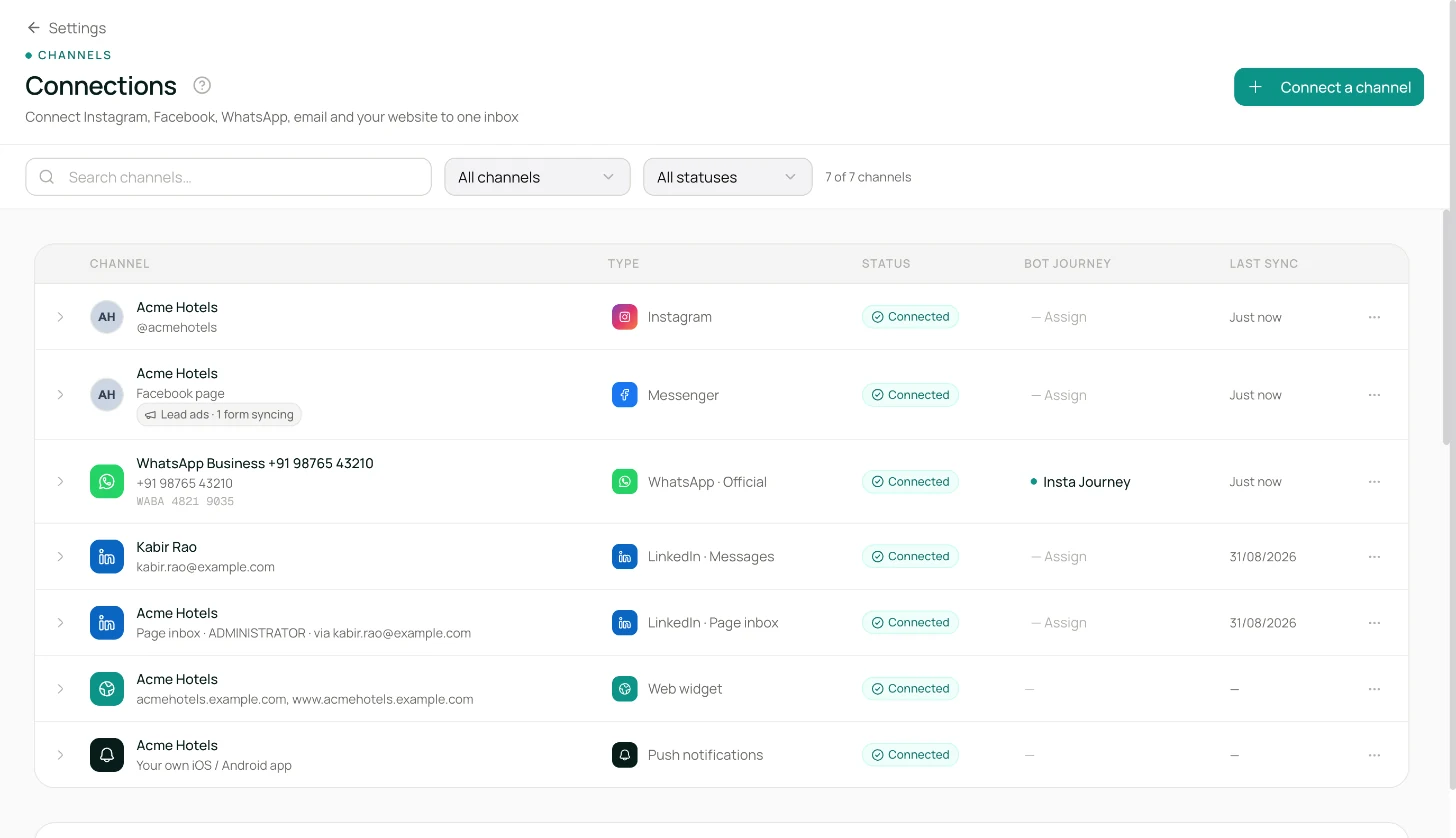
What is Connections?
The problem it solves
Every channel is its own ecosystem. WhatsApp wants the right business-account permissions and a verified phone number. Instagram wants a business account and the right account scope. Messenger wants a Facebook Page and a clean consent flow. Email wants a verified sending domain with the right DNS records. Every channel expires its credentials on its own schedule, and if even one step is missed — a webhook not subscribed, a DNS record not propagated — chats quietly stop arriving, usually overnight, usually on a Friday.
Connections collapses all of this into one admin surface. Adding a channel runs the right setup flow for the provider. Each channel's card shows exactly what's healthy and what needs attention. Reconnecting is a button, not a support ticket. And every card has an inline dropdown to wire a bot journey to that channel.
What you get
- One page per organisation for every channel. WhatsApp Official, WhatsApp Unofficial, Instagram (DMs and comments), Messenger, Email, and Web Chat — each as a card with its own status, actions, and bot-journey assignment.
- Guided setup per provider. Meta products use their standard consent flows. WhatsApp Unofficial uses a phone-number plus QR-code flow scanned from the physical phone. Email uses a domain name plus DKIM and SPF DNS records.
- Status you can read at a glance. Each card shows Connected, Disconnected, or Needs Reconnect, plus a checkmark when inbound is wired up correctly.
- Bot journey assignment per channel. Pick a deployed bot journey and the bot identity to attribute its replies to. One live journey per channel.
- Reconnect when credentials expire. Credentials from the providers don't last forever. When a token expires, a Reconnect action lets an admin refresh it without waiting for support.
- Clean disconnect. Remove a channel and Lodgestory unsubscribes from the provider, deactivates the bot-journey assignment, and marks the channel offline. Past conversations stay in the inbox for reference.
How it's different
- Every channel, one page. No hunting across admin surfaces. If a channel is part of your business, it lives here.
- Bot journey wiring is inline. You don't have to hop to another page to connect a channel to a bot journey — the dropdown is on the channel card.
- The product speaks the hospitality dialect. Whether you need WhatsApp Official for high-volume templates or WhatsApp Unofficial for free-text conversations with groups, both are first-class.
- Email is a proper channel. Your own sending domain with DKIM and SPF, an inbound forwarding address that lands messages in the same inbox — not a white-label subdomain you have to explain.
Customer scenarios
- New property onboarding. Admin clicks Add WhatsApp Official, picks the business account and phone number, approves — the channel card comes back green with webhook subscribed. Inbound WhatsApp now arrives in the unified inbox.
- Agency managing WhatsApp Unofficial for a client. Admin adds an Unofficial channel, enters the phone number, the client scans the QR with their phone, the card flips to connected. Groups and free-text sends work as expected.
- Instagram DMs. Admin adds Instagram, approves in the consent screen, picks the business account. Inbound DMs start flowing into the inbox; replies go out the same way.
- Instagram comments. An admin switches Comments in inbox on for the Instagram card (it's off by default, so a DM-only account never sees a comment thread; accounts connected before August 2026 reconnect once to grant the permission first). From then on every comment on the account's posts, reels and ads lands in the inbox as a thread for that post; the team replies publicly, sends one private reply per comment, or hides spam — without opening Instagram.
- Email domain setup. Admin adds Email, types
mail.example.com. Lodgestory generates the DKIM and SPF records; the admin adds them to DNS; a status check flips the card to Verified. Email is now sent from the operator's own domain. - Credentials expired overnight. The next outbound message fails, the Connections page shows the channel in a Needs Reconnect state, the admin clicks Reconnect, refreshes the credentials, traffic resumes.
How it fits with the rest of Lodgestory CRM
Connections is upstream of almost every other module:
- Home / Unified Inbox — messages only arrive if the channel is connected.
- Campaigns — the channel picker draws from here.
- Bot Journeys — journeys are assigned to channels on this page.
- WhatsApp Templates — templates live on WhatsApp Official channels.
- Web Chat — the nested sub-page for the widget.
- Push notifications (your app) — the nested sub-page for your own mobile app.
- Meta Ads Lead Signals — connects each WhatsApp Official number's Meta dataset so click-to-WhatsApp ads learn which leads qualified or booked; reconnect a number here if its token lacks the events permission.
Core concepts
| Term | What it means |
|---|---|
| Channel | A specific way messages come in. A WhatsApp number, an Instagram account, an email sending domain, your Web Chat widget, a Facebook Page. |
| Connected | The channel's credentials are valid and Lodgestory is authorised to send and receive. |
| Webhook attached | Inbound messages are wired up — new messages from customers will reach the unified inbox. |
| Needs reconnect | Lodgestory can detect that the channel was set up on an older connection style. Running Reconnect refreshes it to the current form. |
| Bot journey assignment | The deployed journey that handles inbound on this channel, plus the bot identity used for its replies. |
| Domain verification | The process that proves you own the email sending domain using DKIM and SPF DNS records. |
| Comments in inbox | A per-account switch on the Instagram card. When it's on, comments on that account's posts, reels and ads arrive in the unified inbox as one thread per post. It needs the comments permission, which Lodgestory requests when the account is connected — accounts connected earlier show Reconnect to enable comments instead. |
Quick Start — connect a WhatsApp Official channel in 5 minutes
Step 1 — Open Connections
Sidebar: Settings → Connections.
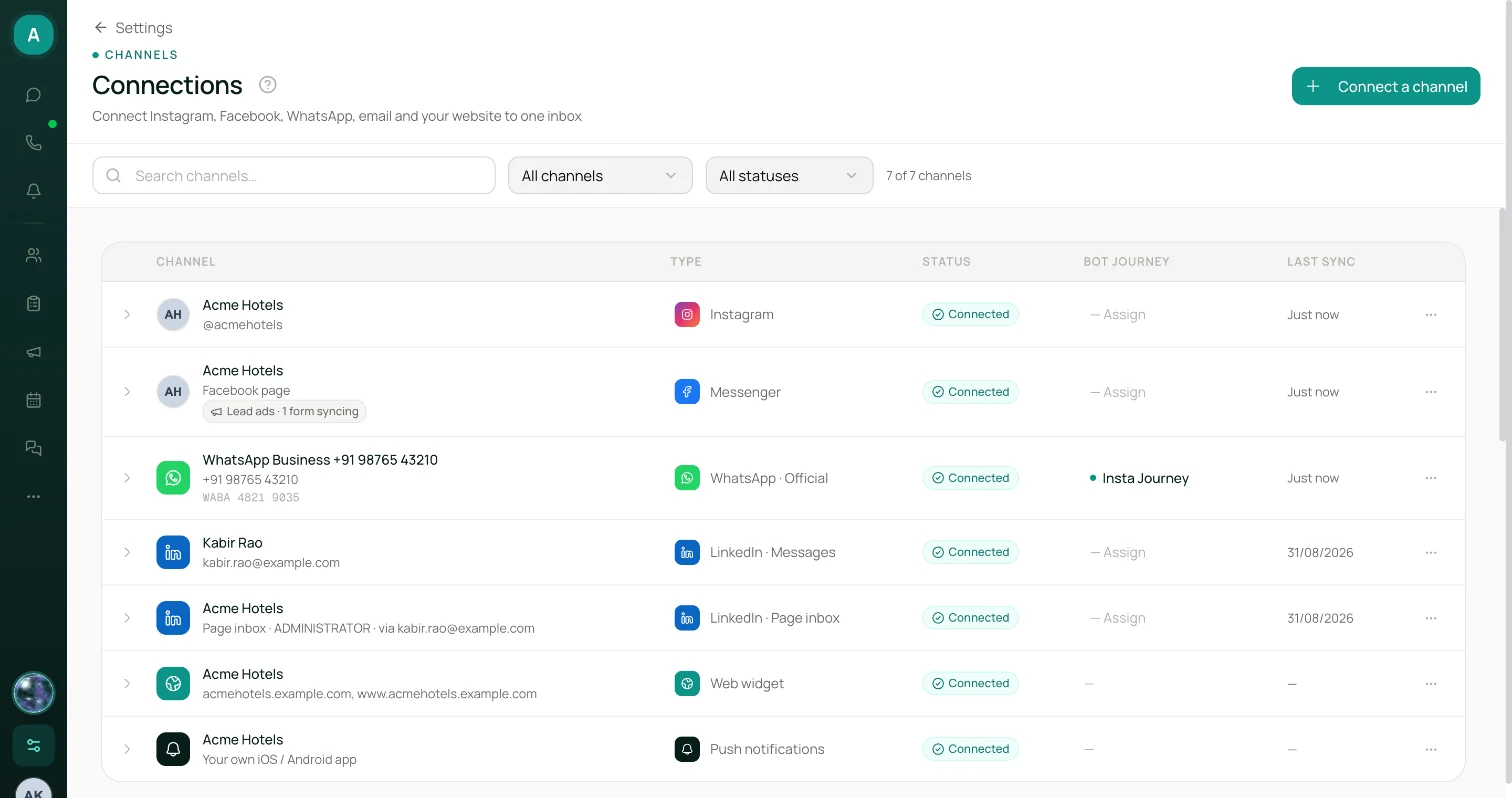
Step 2 — Click + WhatsApp Official
A consent screen opens in a new tab.
Step 3 — Pick your business account and phone number
Pick an existing business account (or create one) and the phone number on it. If the phone number isn't verified yet, the consent flow guides you through a quick verification.
Step 4 — Authorise
Approve, and Lodgestory sets up the rest: stores the credentials, subscribes to inbound, fetches your business profile, and marks the channel connected.
Step 5 — Verify the card
Back on the Connections page the new card shows Connected · Webhook Attached. A quick test message from any phone to the WhatsApp number should arrive in the inbox within seconds.
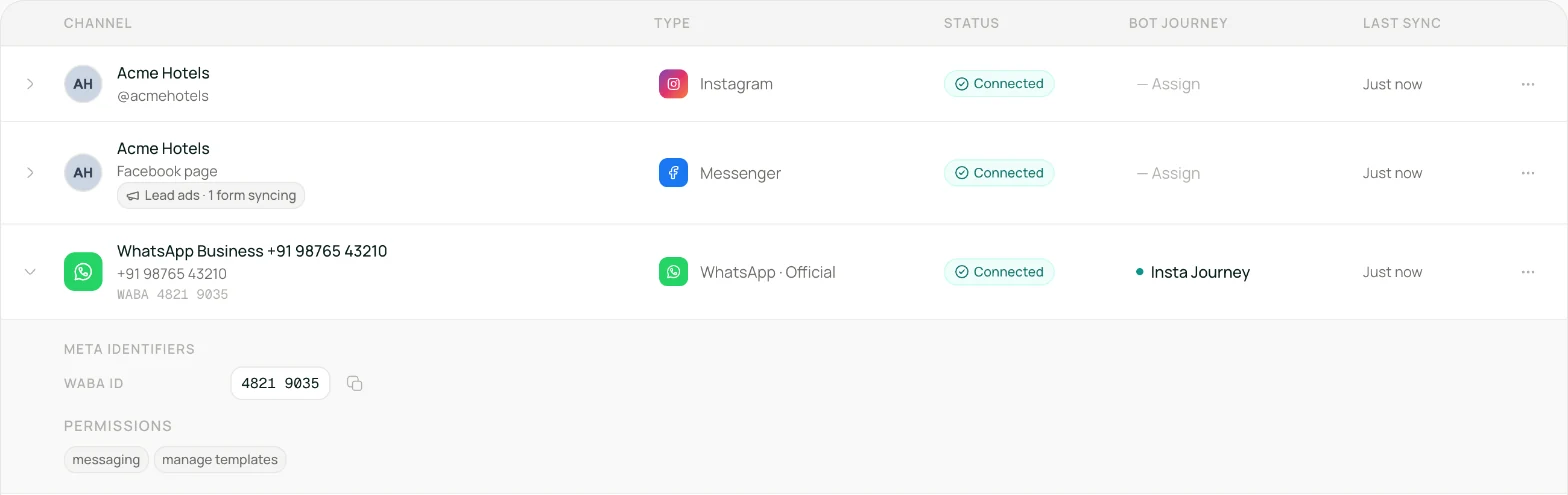
Step 6 — Assign a bot journey (optional)
On the same card, pick a deployed bot journey and a bot identity, save. Inbound messages will now trigger the journey.
What's next
- Submit your first approved WhatsApp template → WhatsApp Templates
- Add a second channel — Email, Instagram, or Web Chat — and keep the same bot journey or a different one.
- Enable Web Chat on your website.
How it works
Adding a channel runs the right setup flow for its provider, stores the credentials securely, and subscribes Lodgestory to inbound messages. For Meta products (WhatsApp, Instagram, Messenger) that's a consent screen plus the provider's approved permission bundle. For WhatsApp Unofficial, it's a phone number plus a QR scan from the physical phone. For Email, it's a domain name, a pair of DNS records, and a quick verification.
From that point the channel is live. Inbound messages arrive in the unified inbox; outbound replies go back through the same channel. Each channel's card shows the current health — connected, inbound wired up, business verified where applicable — plus the bot journey assigned to it if you've set one.
Credentials don't last forever. When one expires, the next outbound message fails and the channel's card flips to Needs Reconnect. Reconnect runs the same flow as the initial setup but recognises the existing channel and refreshes it in place — no new channel created, no history lost.
Removing a channel unsubscribes Lodgestory from the provider, deactivates the bot-journey assignment, and marks the channel offline. Past conversations stay for reference; new inbound on that channel stops.
Features in depth
Adding a channel
Each provider has an Add button at the top of the page. Clicking it opens the right flow — a consent screen for Meta products, a phone-input plus QR-scan flow for WhatsApp Unofficial, a domain-setup flow for Email. Once the flow completes you return to Connections with the new channel card rendered.
Why a Facebook Page may not connect. The Connect dialogs carry an info icon with the same list: tick the Page in Facebook's dialog (choose Edit settings if Facebook offers "Continue as …") and keep every Page you already use with Lodgestory ticked; leave every permission switch on in the last step, because with Show a list of the Pages you manage off no Page can be connected; and a Page you manage only through a business portfolio needs your own profile under the Page's Page access settings (and two-factor authentication on your account if the portfolio requires it), otherwise it can be missing from Facebook's list or refuse to connect.
Channel cards
Every card shows:
- Provider icon and channel name. For WhatsApp, the phone number. For Instagram, the account handle. For Email, the domain.
- Status badges. Connected (green), Disconnected (red), Needs Reconnect (amber), Webhook Attached (green check), Verified (blue check on Meta-verified business accounts).
- Provider metadata. Instagram follower count, WhatsApp business name, Messenger page name, Email domain verification state.
- Bot journey dropdown. Pick a deployed journey and a bot identity. Save to activate. One active journey per channel.
- Reconnect — for channels that need a refresh.
- Lead ads. A Messenger row whose Page is also connected for lead ads shows a Lead ads · N forms syncing chip and a Manage link to Meta Lead Ads; other connected Pages offer Connect Lead Ads. The Connect a channel menu links there too.
- Disconnect — with a confirmation dialog. For Instagram, Messenger and WhatsApp Unofficial this is reversible: Disconnect (keep chats) stops messaging but keeps every chat, message and ticket, while Delete channel & data (admins and owners only) permanently removes the channel together with its history.
WhatsApp Unofficial setup
Enter a phone number plus an optional label. Lodgestory provisions an account with your provider, renders a QR code, and waits. Scan the QR with the physical phone's WhatsApp, and the card flips to connected. If the setup times out or fails — phone already paired elsewhere, provider issue — you'll see a clear failure message and can retry with a different phone.
A WhatsApp Unofficial number that has dropped its session (the phone was unlinked, went offline for too long, or the provider reset it) shows Disconnected with a Rescan QR button. If you no longer want the number, open the card menu:
- Disconnect (keep chats) unlinks the phone and removes the provider session. The number stays listed as Disconnected, all its chats and history remain in the inbox, and the card offers Add number again — enter the same number, scan the QR, and the existing conversations pick up where they left off.
- Delete channel & data removes the number and erases all of its chats, messages and tickets. This cannot be undone and needs a CRM admin or account owner.
Email domain verification
Enter a sending domain, like mail.example.com. Lodgestory generates the DKIM and SPF DNS records you need to publish. Copy them into your DNS registrar, wait for propagation (usually minutes, sometimes up to a few hours), then click Verify. A forwarding address is generated for inbound email; route your inbound to that address and replies land in the unified inbox.
Instagram comments in the inbox
An Instagram card covers two things: DMs, which are on from the moment the account is connected, and comments on the account's posts, reels and ads, controlled by a Comments in inbox switch on the card.
- Opt in. Comments are off by default — an account that only wants DMs never sees a comment thread. Once the comments permission is granted (connect, or Reconnect for older accounts), switch Comments in inbox on. From that moment, every new comment on the account's media lands in the unified inbox as one comment thread per post, reel or ad, with the post's thumbnail and caption at the top. Reply publicly, send a private reply, hide or delete — see Instagram comment threads for the full walk-through.
- Reconnect to enable comments. Lodgestory asks for the comments permission when an Instagram account is connected. Accounts connected before comments were available don't have it yet, so their card shows Reconnect to enable comments instead of the switch. Click Reconnect, approve on Instagram, and the switch appears. Reconnecting refreshes the account in place — chats and history are kept, nothing is duplicated.
- The account must be public. Instagram only sends comment notifications for public professional accounts. A private account still sends and receives DMs, but its comments won't arrive.
- From now on, not from before. Comments start flowing from the moment you enable them; older comments aren't imported. Open any thread and click Refresh to pull that post's current comments from Instagram — useful for a post that was already busy before you switched comments on, or after moderating in the Instagram app.
- Pause any time. Switch Comments in inbox off and new comments stop arriving; existing threads stay in the inbox for reference. Switch it back on to resume.
Comments follow the rules Instagram applies everywhere: a public reply is text only (up to 2,200 characters); a private reply is one Instagram DM per comment (text only, up to 1,000 characters, within 7 days of the comment), and Instagram caps private replies at 750 per hour per account.
Browser chat savings
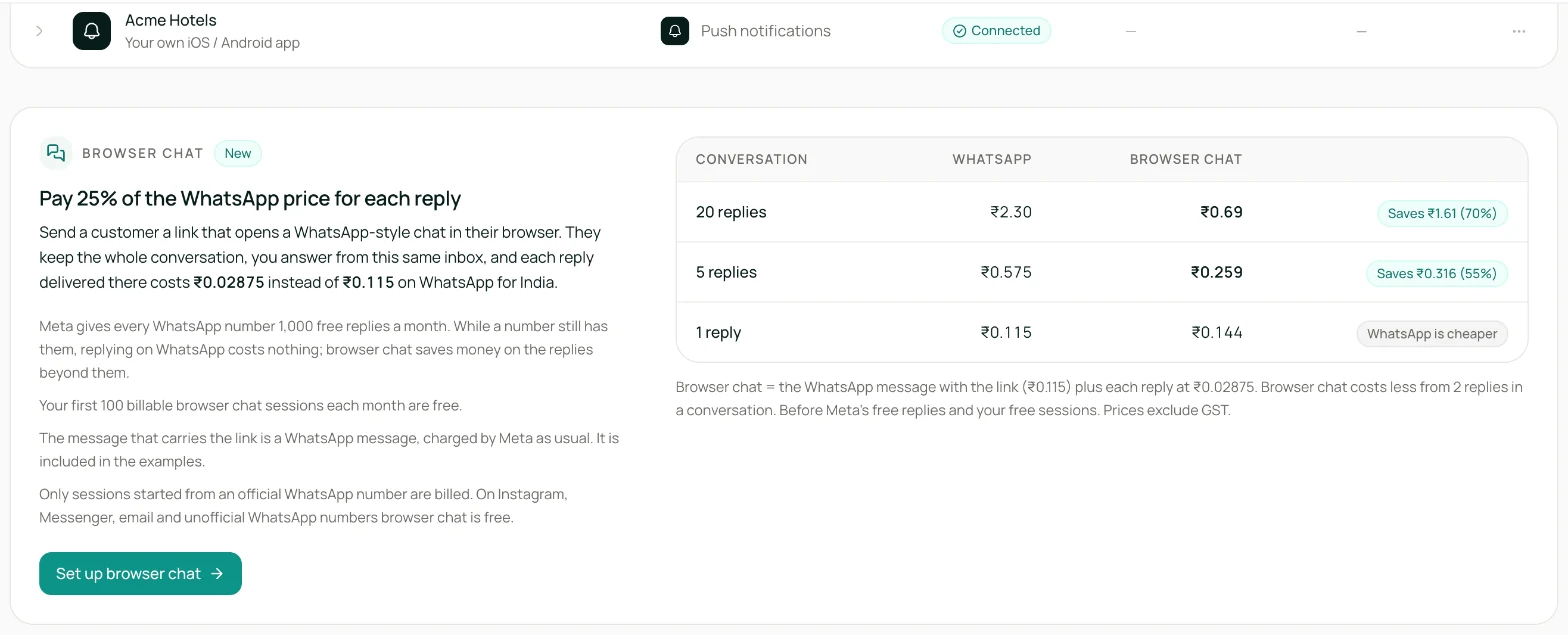
Below the channel list, a Browser chat card shows what moving conversations to browser chat would cost compared with replying on WhatsApp, for your own home market: WhatsApp's price per reply, the browser chat price (a quarter of it), and worked examples for short and long conversations — including the one case where plain WhatsApp is cheaper. It also states the free allowances on both sides: WhatsApp's first 1,000 replies per number each month, and your first 100 charged browser chats each month. Set up browser chat opens its settings.
Reconnect
On a channel that's in Needs Reconnect, Reconnect re-runs the provider's consent flow, but Lodgestory recognises the returning channel and refreshes the credentials in place. No new channel is created.
Roles and permissions
| Action | Account Owner | Admin | User | Bot |
|---|---|---|---|---|
| View Connections page | Yes | Yes | No | No |
| Add a channel | Yes | Yes | No | No |
| Reconnect a channel | Yes | Yes | No | No |
| Disconnect a channel | Yes | Yes | No | No |
| Assign or unassign a bot journey | Yes | Yes | No | No |
| Turn Instagram comments on or off | Yes | Yes | No | No |
Cross-module workflows
A. Full onboarding for a new WhatsApp property
Connections: add WhatsApp Official, complete consent, the channel goes green. Templates: submit your first approved template. Campaigns: run the first broadcast. Bot Journeys: build a first-response journey and assign it to the channel. Home: the first reply lands in the inbox.
B. Scaling to multi-channel
Add Email for longer-form follow-ups, Instagram for the DMs and comments an influencer campaign brings in, Web Chat on the marketing site. Share a single bot journey across WhatsApp and Web Chat, or give each channel its own.
C. Recovering a stalled channel
Traffic suddenly quiets on WhatsApp. Connections shows Needs Reconnect on the channel. An admin clicks Reconnect, the provider's consent screen refreshes the credentials, traffic resumes — usually within a minute.
Limits a user will run into
| Limit | Value |
|---|---|
| Channels per organisation | Plan-tier based. Your plan page shows live counts. |
| Active bot journey per channel | 1 |
| Email domain verification | Usually minutes, up to a few hours for DNS propagation |
| WhatsApp Unofficial QR session | Scans must complete within a few minutes or the setup times out |
| Instagram public reply or comment | Text only, up to 2,200 characters |
| Instagram private reply | One per comment, text only, up to 1,000 characters, within 7 days of the comment. Instagram allows 750 private replies per hour per account. |
| Instagram comment history | Comments arrive from the moment Comments in inbox is switched on (it's off by default). Refresh on a thread pulls that post's current comments. |
Errors and FAQ
Errors you might see
| Message | What it means | What to do |
|---|---|---|
| Failed to load accounts | A temporary fetch failure. | Reload the page. |
| Failed to disconnect | The provider refused the request or something went wrong on the platform side. | Retry; if persistent, contact support. |
| User denied consent | You clicked Cancel on the provider's consent screen. | Retry and approve. |
| Missing organisation in callback | The consent flow started in a different browser session than the one completing it. | Start and finish the flow in the same browser. |
| Business account validation failed | The provider returned a business account missing required phone numbers or permissions. | Re-run the consent flow; pick a business account with phone numbers attached. |
| Webhook subscription empty | The provider returned success but no inbound subscription. | Run Reconnect; this usually clears on the retry. |
| Setup failed (WhatsApp Unofficial) | The provider couldn't provision the phone. | Try a different phone; contact your provider if it persists. |
| Verification pending (Email) | DNS records haven't propagated yet. | Wait up to a few hours and click Verify again. |
| Session has expired (outbound) | Provider credentials have expired. | Open Connections and click Reconnect on the affected channel. |
| Reconnect to enable comments (Instagram card) | The account was connected before comments were available, so Lodgestory doesn't have the comments permission for it yet. | Click Reconnect and approve on Instagram. Chats and history are kept. |
| Instagram session expired — reconnect the account in Settings › Connections | Instagram's credentials for the account have expired. | Click Reconnect on the Instagram card. |
FAQ
My channel shows connected but new messages aren't arriving.
Check that the card shows Webhook Attached in addition to Connected. Send a test message from a personal phone to the business number; it should arrive within seconds. If silence persists, run Reconnect.
Why does my Messenger connection show "Needs Reconnect" even though it was working?
The channel is on an older style of connection. Reconnect upgrades it in place and refreshes the token as a side effect. Nothing is lost.
I connected WhatsApp Official but no templates are showing.
Templates are managed separately in WhatsApp Templates. After connecting, either run Sync from Meta (to pull existing approved templates) or author new ones. Newly-created business accounts start with zero templates.
Why is the Instagram button missing?
It appears only when Instagram is available for your organisation. Contact support if you expect it to be there.
Comments aren't arriving in the inbox.
Work down this list on the Instagram card: Comments in inbox is on (if the card says Reconnect to enable comments, reconnect first — the switch appears once the permission is granted); the Instagram account is a public professional account (Instagram doesn't send comment notifications for private accounts); the comment is newer than the moment you switched comments on (older comments aren't imported — open the post's thread and click Refresh to pull them); and the comment wasn't posted by your own account (your own comments and replies show in the thread but never count as new). If everything checks out and comments still don't arrive, run Reconnect.
Why can't I DM this commenter again?
A private reply is a one-time Instagram DM sent from a comment: one per comment, within 7 days of the comment, text only. Once it's sent, the commenter's Instagram chat stays read-only for you until they reply — Instagram opens its usual 24-hour messaging window only when they do. To reach them in the meantime, reply publicly under their comment.
Can I use the same Facebook Page for Messenger and a WhatsApp connection?
Yes. Add them as two separate connections here. Both can share the same Facebook Page identity.
WhatsApp Unofficial keeps failing at the scan step.
Common causes: the phone is already paired with another WhatsApp device elsewhere (unlink first), or the phone's WhatsApp is offline. Try a different phone.
What happens to existing conversations when I disconnect a channel?
Past conversations stay in the inbox for reference. New inbound on the channel stops; new outbound won't go through. Reconnecting restores both.
API
A partner API is available for listing channels, connecting, disconnecting, and assigning bot journeys. Contact your account team for access. Instagram comments have their own partner endpoints — see the Instagram comments API.
Changelog
- Oct 2026 — Added the Browser chat savings card under the channel list.
- Aug 2026 — Instagram comments: a Comments in inbox switch on every Instagram card brings comments on your posts, reels and ads into the unified inbox as one thread per post, with public reply, private reply (DM), hide and delete per comment. Accounts connected earlier show Reconnect to enable comments.
- Apr 2026 — Initial public documentation.
Related modules and next steps
- Web Chat — the nested sub-page, covered in its own guide.
- Channel runtime config — per-channel auto-attach state machines, agent-recency, and send-rate pacing. Sits behind a button on each channel row in the Configuration sub-page.
- Away Schedule — per-channel off-hours auto-reply with business hours, holidays, and a "we're away" message. Sister modal to Channel runtime config.
- WhatsApp Templates — templates live on WhatsApp Official channels you add here.
- Bot Journeys — assigned to channels on this page.
- Campaigns — the channel picker draws from the channels you connect here.
- Home / Unified Inbox — where messages from every connected channel land.
- Instagram comment threads — how comment threads work once Comments in inbox is on.
- Automations → Instagram comments — reply to comments, DM commenters, and hide spam automatically.
Updated 2 days ago