
Away Schedule
Lodgestory CRM › Settings → Connections → Configuration → Away schedule
Reply automatically when nobody else will — and only then. Configure business hours, holidays, and an off-hours message per channel; one polite "we're away" instead of silence.
TL;DR
- What it is — a per-channel switch that fires a configured "we're away" reply when an inbound message lands outside business hours and neither your bot journey nor AI autopilot will respond. One reply per off-hours block per chat — no spam, no double-sends.
- Who it's for — Account Owners and Admins. Configure once per channel; the rule runs itself.
- Top outcome — every guest who messages you at 11 PM on a Sunday gets an instant, branded acknowledgement instead of silence. No more "anyone there?" follow-ups arriving at 9 AM.
At a glance
| Plan tiers | All paid tiers. |
| Who can configure | Account Owners and Admins. |
| Where it lives | Settings → Connections → Configuration → Away schedule button on a channel row. Each channel has its own schedule. |
| Channels supported | Every inbound channel: WhatsApp Official, WhatsApp Unofficial, Instagram, Facebook Messenger, Email, and Web Chat. |
| Integrations | Reuses the channel's existing send pipeline — Meta APIs, your email sending domain, the Web Chat real-time push. No separate provider to wire up. |
| Top limits | One throttled reply per chat per off-hours block. Up to 5 time windows per day in the weekly schedule. Holiday CSV uploads up to a few thousand rows per file. |
| API | Yes — partner API for read, update, holiday-CSV upload, and listing curated holiday presets. |
How to find it
Settings → Connections → Configuration → Away schedule (per-channel button).
Direct URL for the configuration page: https://lodgestory.com/crm/settings/connections/configuration
The Configuration page lists every connected channel as a row. Each row has two buttons: Channel runtime config (auto-attach, agent recency, send rate — covered in Channel runtime config) and Away schedule (this guide). Clicking Away schedule opens the modal for that channel.
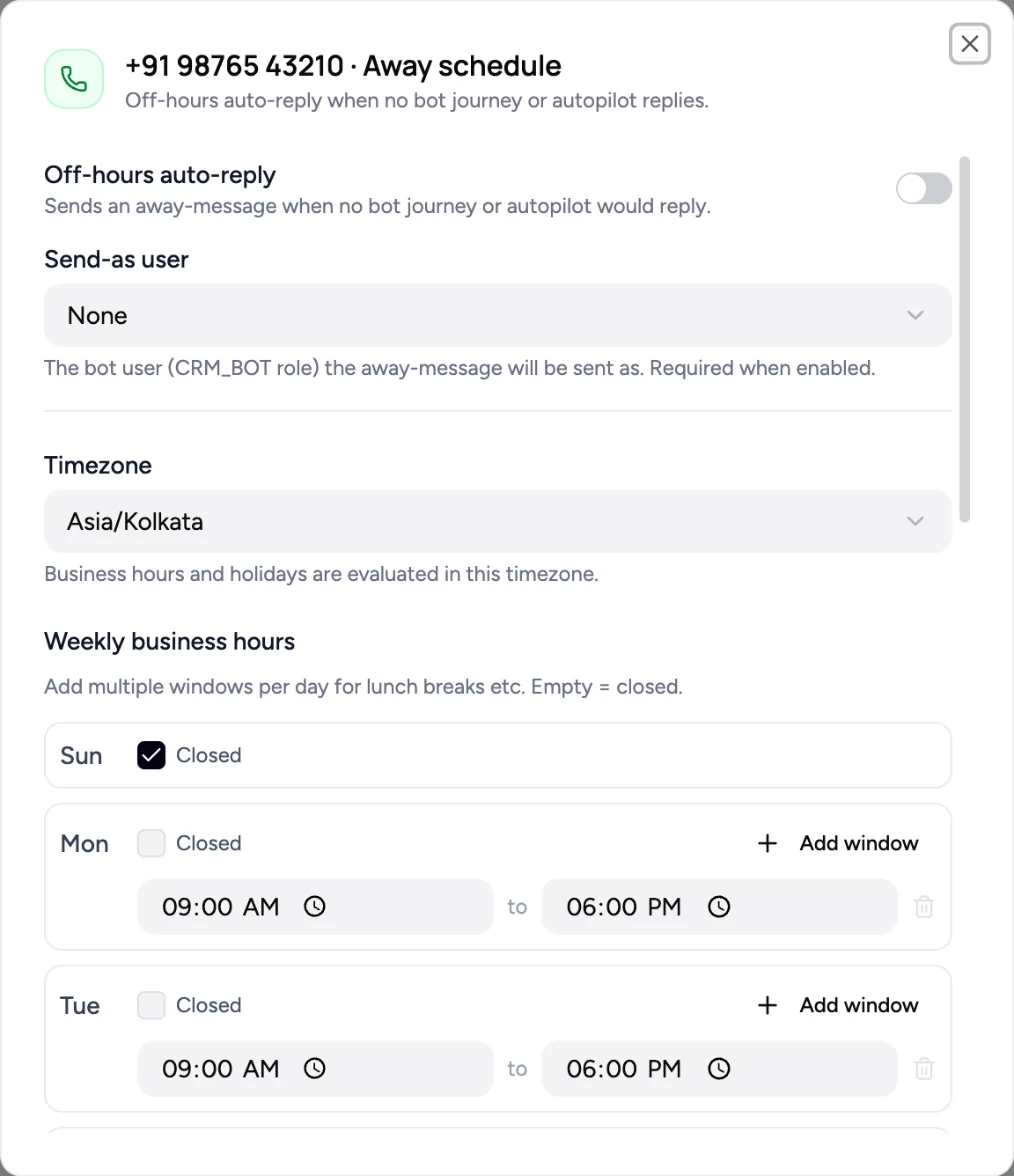
What is Away Schedule?
The problem it solves
Most inbound channels have a quiet middle-of-the-night problem. A guest sends "is the villa pet-friendly?" at 11 PM on a Saturday. Your bot journey doesn't have a node for it; AI autopilot is off on this chat because an agent took it last week; nobody on your team is online. The guest sees their message delivered, then nothing. Some come back the next morning. Some don't.
Away Schedule fills the silence — but only when there's actually silence to fill. It hooks in after every other reply path has declined: the bot journey skipped, the AI autopilot is off or returned nothing, no agent is online. At that exact moment, the configured away-message goes out as a real message on the same channel, attributed to a CRM_BOT user you pick. The guest sees a thoughtful acknowledgement; your inbox gets a clean "we replied" record.
What you get
- Per-channel configuration. Each channel has its own timezone, weekly hours, holiday list, and message text. WhatsApp can speak Asia/Kolkata hours; an Instagram account for a US property can speak Eastern.
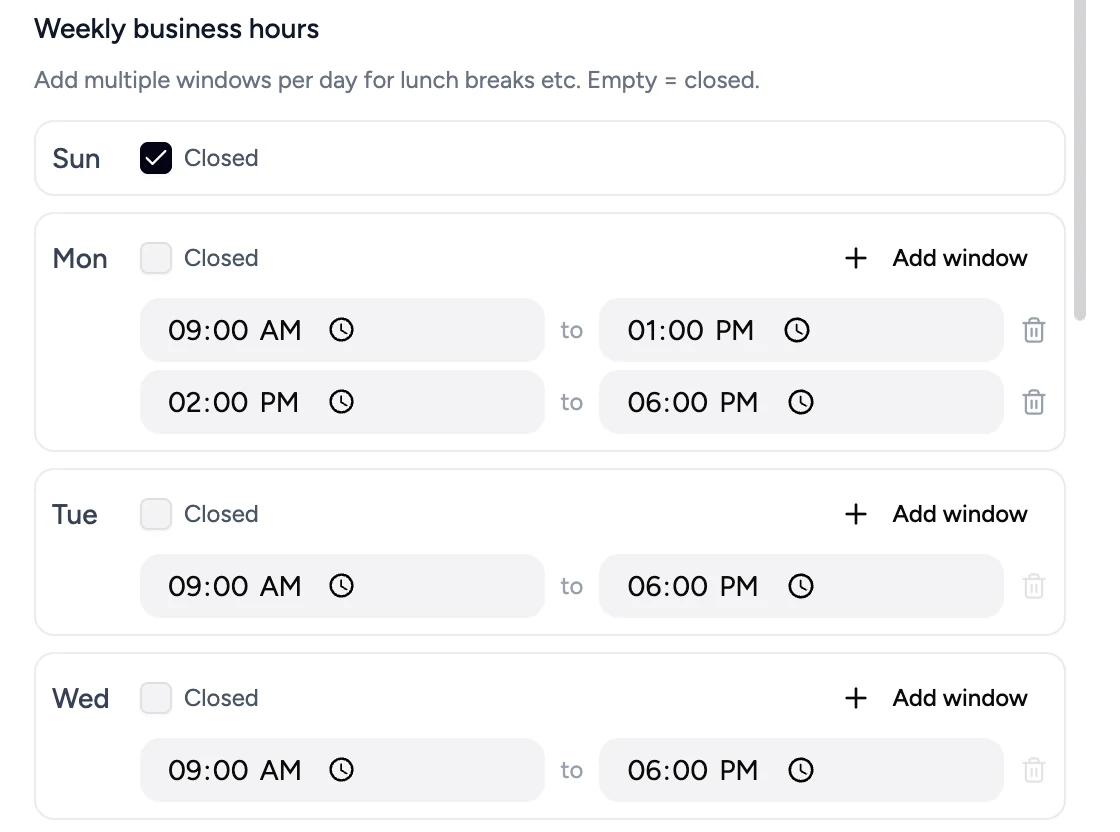
- Multi-window weekly hours. Days aren't just "open" or "closed" — each day can have multiple in-hours windows (e.g., 09:00–13:00 and 14:00–18:00 to model a lunch break).
- Holidays as plain dates. Mark specific dates as holidays; on those dates, the channel is treated as closed all day regardless of weekly hours.
- CSV upload for holidays. Curate your country's public holidays once as a spreadsheet, upload, and reuse across years and channels — no copy-paste from a list of dates.
- One reply per off-hours block per chat. Throttled per chat by a Redis lock that auto-expires at the next in-hours boundary. A guest who sends ten messages between midnight and 9 AM gets exactly one away-message.
- Send-as a real bot user. The reply is attributed to a
CRM_BOT-roled user you pick from the list. Same identity model as the bot-journey send-as user — no implicit "system" sender. - Coexists cleanly with agents. If an agent replies after the away-message, the throttle keeps holding for the rest of the off-hours window — no second "we're away" while a real conversation is in flight.
- Off by default per channel. A channel without an Away Schedule row behaves exactly as before. Enabling is a deliberate per-channel act.
How it's different
- Fires only at the dead-end. Most "office hours" widgets fire blindly on every off-hours message. Lodgestory's hooks at the very end of the autopilot listener — after the bot journey skipped and AI autopilot declined and no agent took over. If a journey or autopilot replies, the away-message stays silent.
- Channel-native send. The away-message goes out through the channel's normal send pipeline —
createMessagein WhatsApp's case, an Ably push in Web Chat's case, a Resend email in Email's case. The guest sees a real message in the same thread, not a different envelope. - Per-chat throttle, not per-channel. Two unrelated guests messaging at midnight each get one away-message. The throttle is keyed to
(channel, chat), not just(channel), and resets at the next in-hours boundary. - The send-as user is a real bot user. The same
CRM_BOT-role gate the bot-journey channel-assignment uses. Your inbox attributes the reply to a real account, not a fictional system identity.
Customer scenarios
- Boutique hotel, Asia/Kolkata, weekdays 09:00–18:00 with a 13:00–14:00 lunch break. A guest messages WhatsApp at 13:30. Bot journey is off; agent recency window has lapsed. Away-message fires: "Lunch break till 2 PM IST — we'll be right back." At 14:30 the same guest follows up; in-hours, no away-message, normal flow.
- Regional operator with public holidays. Admin uploads
IN-2026.csvonce. Diwali, Republic Day, Eid — all configured as holidays. On Diwali day a guest messages at 14:00 (normally in-hours); away-message fires anyway because the date is on the holiday list. - US-East property on Instagram. Channel timezone
America/New_York. A guest sends a DM at 23:00 ET. Server is in Asia/Kolkata. The off-hours determination uses the channel's NY local time, not the server's IST time. Away-message fires correctly. - Email channel, weekend escalations. Sat/Sun configured as no windows (closed all day). A guest emails Saturday morning; the reply goes out as an email from your verified sending domain, with
Re:threading off the original subject. Monday at 09:00 the throttle has long expired and the next email starts a fresh thread normally.
How it fits with the rest of Lodgestory
- Connections — Away Schedule is a per-channel concern, configured from the Connections → Configuration page after a channel is connected.
- Channel runtime config — sister modal on the same Configuration page; covers auto-attach state machines, agent recency, and send-rate. Independent of Away Schedule.
- Bot Journeys — when a journey replies, the away-message stays silent. The hook fires after the journey decision (handled in
live-session.service.ts). - Workflow Lifecycle Stages — unaffected. The away-message is sent as a normal outbound; it doesn't transition any stage.
- Home / Unified Inbox — the away-message appears in the conversation thread like any other outbound, attributed to the picked CRM_BOT user.
Core concepts
| Term | What it means |
|---|---|
| Away schedule | The per-channel configuration row: timezone, weekly hours, holidays, message text, send-as user, enabled flag. |
| In-hours / off-hours | Determined from the channel's timezone, the day's weekly windows, and the holiday list. A holiday makes the day closed regardless of windows. |
| Window | One time range within a day, like 09:00–13:00. Each day can have multiple windows; an empty list means the day is closed. |
| Holiday | A specific date (YYYY-MM-DD) marked as closed. Lives on the schedule and can be added by hand or imported from a curated CSV. |
| Holiday preset | A reusable per-organisation curated list of holidays for a country and year, populated by CSV upload. The schedule's own holidays are independent — importing copies dates in, after which you can edit or remove them on this channel without touching the preset. |
| Send-as user | The bot user (must have role CRM_BOT) the away-message is attributed to. Required when enabled. |
| Throttle | The Redis lock that prevents a second away-message in the same off-hours block per chat. Key: away-msg:{channelId}:{wpCrmChatsId}. TTL: ms until the next in-hours boundary. |
| Off-hours block | A continuous span of off-hours time. The throttle TTL covers exactly one block; the next block re-arms automatically. |
Quick Start — turn on Away Schedule for a WhatsApp channel in 5 minutes
Step 1 — Open Configuration
Settings → Connections → Configuration.
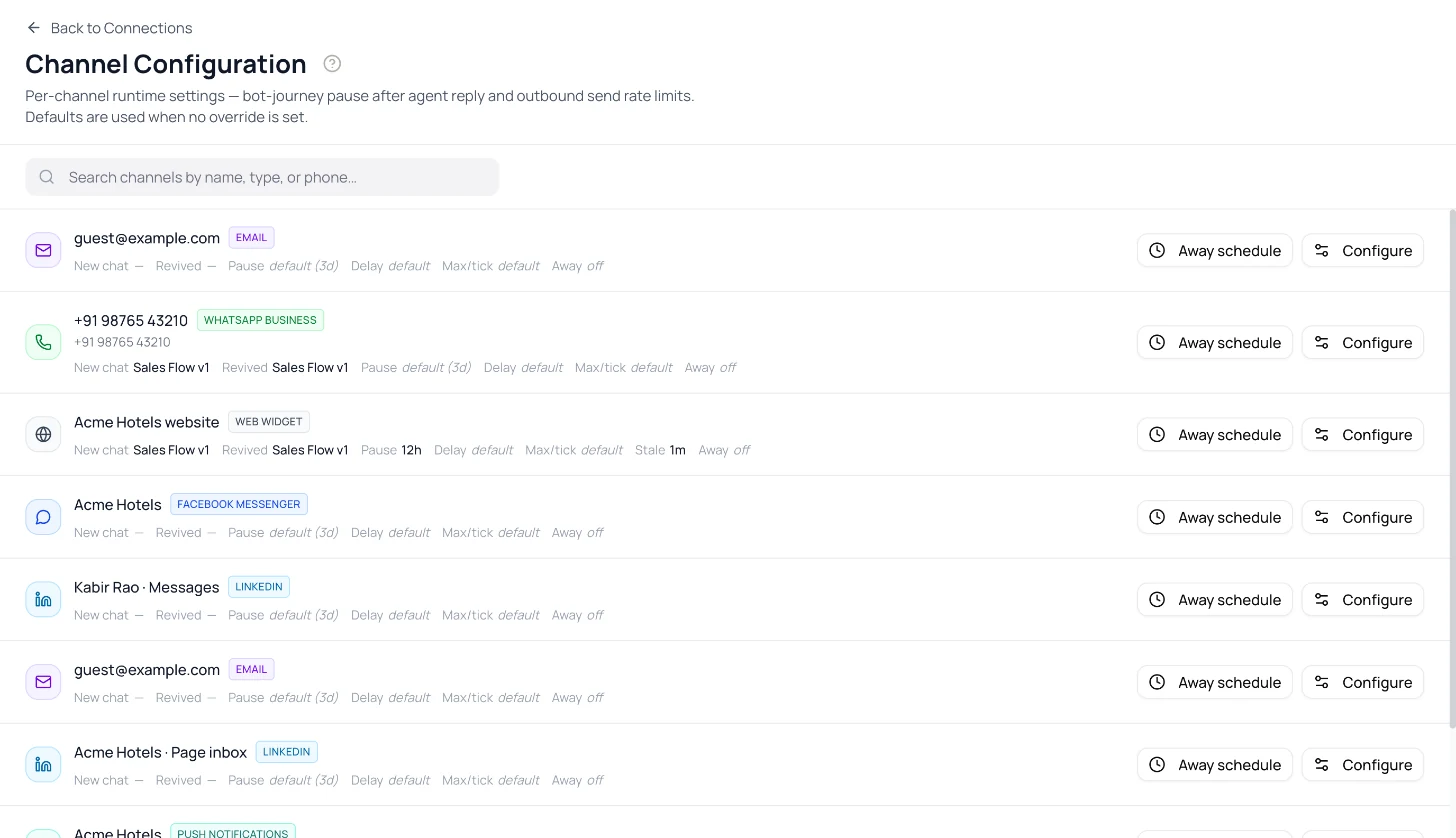
Step 2 — Click Away schedule on the channel row
The modal opens with the current configuration (or sensible defaults: Asia/Kolkata, Mon–Fri 09:00–18:00, no holidays, empty message).
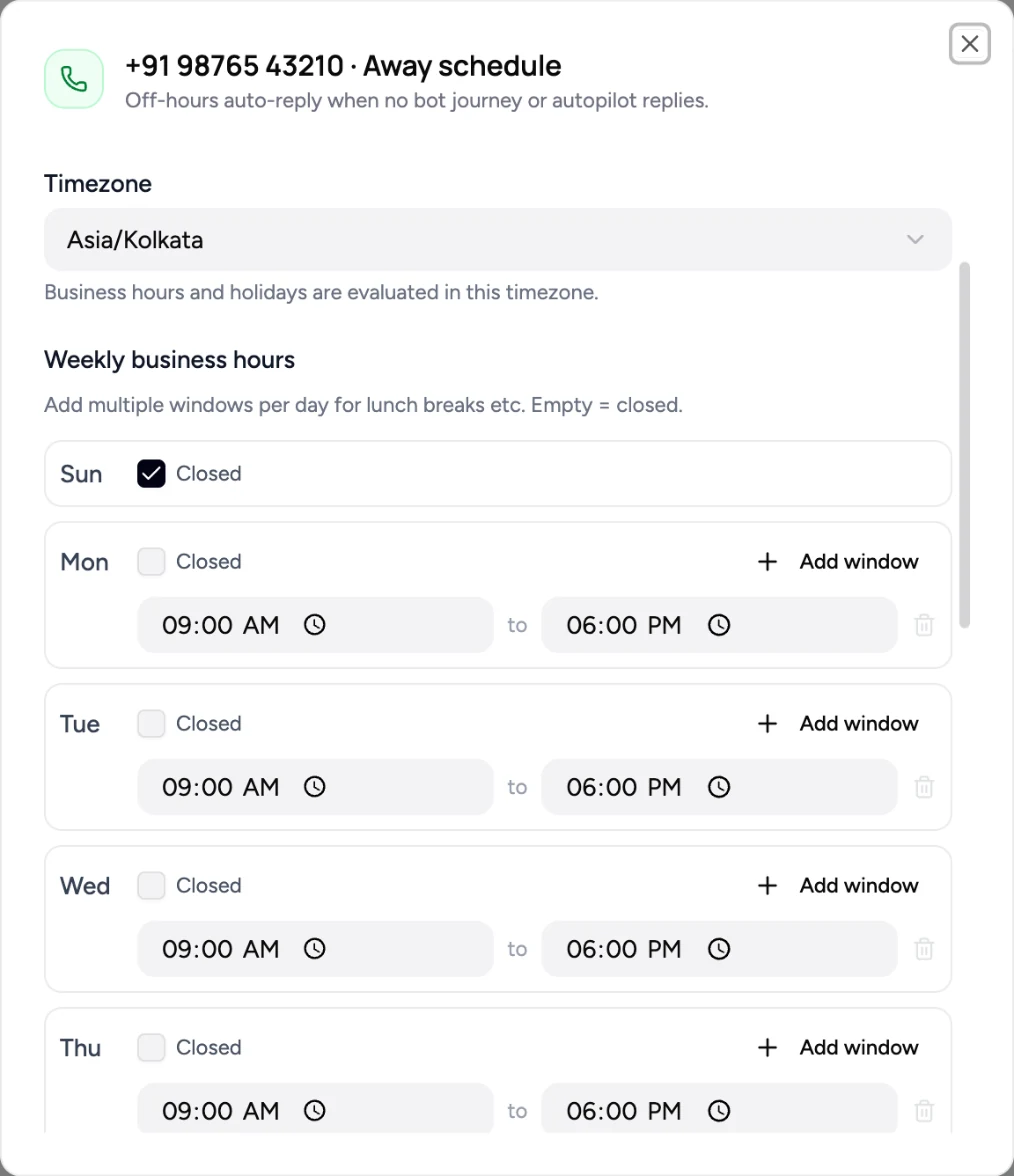
Step 3 — Pick the timezone and weekly hours
Choose your channel's IANA timezone (default Asia/Kolkata). Set each day's windows. For a single window per day use one row per day; for a lunch-break model add two rows.
Step 4 — Add holidays (optional)
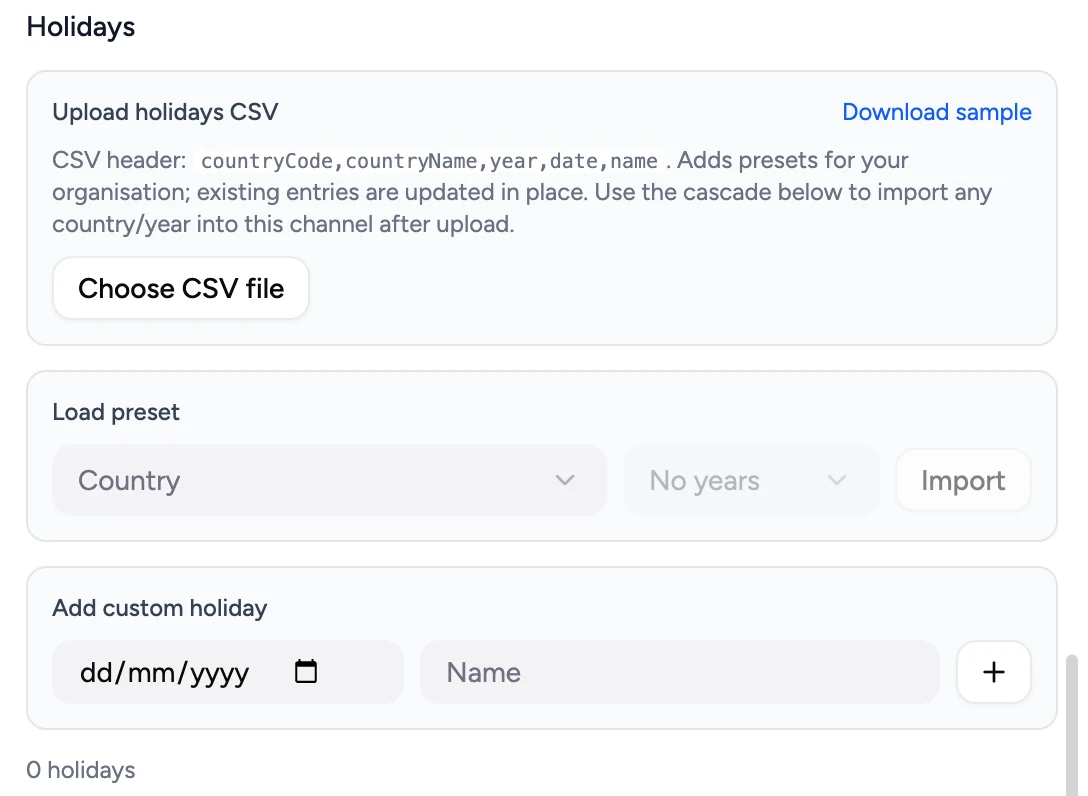
Use Add custom to type a date and a label. Or click Load preset, pick a country and year (only years you've already uploaded show up), and the preset's dates merge into the schedule.
To create a preset: click Choose CSV file and upload a five-column CSV (countryCode,countryName,year,date,name). Re-uploading is safe — duplicates collapse on (organisationId, countryCode, year, date).
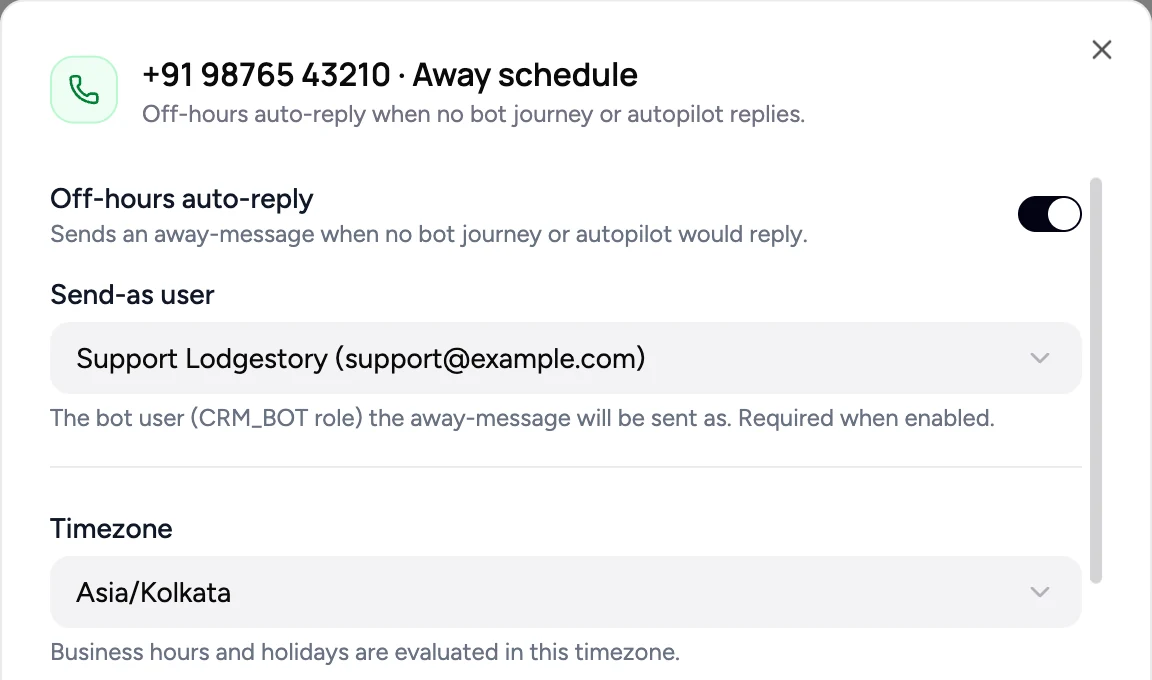
Step 5 — Pick the send-as user
The dropdown lists every user in the organisation who has the CRM_BOT role. Pick one. If the dropdown is empty, ask an admin to assign CRM_BOT to a user (Settings → Team Members) before enabling.
Step 6 — Type the away message
Plain text, sent as the message body. Keep it short and on-brand — guests see this in WhatsApp, Email, Instagram, etc.
Step 7 — Enable and save
Flip the Enable toggle on, click Save. The Configuration page row will show an Away: on indicator the next time it loads.
What's next
- Configure your other channels — each one has its own schedule.
- Combine with Channel runtime config for the full per-channel automation story.
- Build a bot journey that handles common in-hours questions; the away-message will only fill the gap.
How it works
When the away-message fires
Every inbound message on every channel routes through the same listener (handleCrmAutoPilot). That listener has four "we're not going to reply" exits:
- The bot journey skipped (no journey configured, the live session ended in
agent_transferred, or an agent replied within the agent-recency window — see Channel runtime config). - The chat has AI autopilot turned off.
- AI autopilot is on but no AI agent prompt is configured for the channel.
- AI autopilot ran but returned an empty response.
At each of those four exits, the listener kicks off maybeSendAwayMessage synchronously — fire-and-forget, no await, so the listener returns to the next message immediately. The Promise's only consumer is .catch(), which logs a warning and swallows.
What maybeSendAwayMessage actually does
maybeSendAwayMessage actually doesflowchart TD
A[Inbound message] --> B{Bot journey replied?}
B -- yes --> Z[Done — no away message]
B -- no --> C{Autopilot replied?}
C -- yes --> Z
C -- no --> D[fire maybeSendAwayMessage]
D --> E[loadConfigCached]
E --> F{enabled?}
F -- no --> Z
F -- yes --> G{in business hours?}
G -- yes --> Z
G -- no --> H[acquireLock throttle key]
H -- already held --> Z
H -- acquired --> I[createMessage on channel]
I --> Z
Five guards, in order:
- Config exists? No row for the channel → return. Cached as a sentinel for 5 minutes so un-configured channels never repeat the DB query.
enabled = true? Otherwise return.- Send-as user exists? Defensive — DTO validation requires it when enabling, but if the user got deleted later we bail.
- In business hours? Computes the channel's local time using
Intl.DateTimeFormatand the configured timezone, then checks the day's windows and the holiday list. - Throttle acquired? Redis SETNX on
away-msg:{channelId}:{wpCrmChatsId}with TTL = ms until the next in-hours boundary (computed by walking forward day-by-day up to 14 days).
If all five pass, the message goes out via createMessage — the same unified send pipeline the bot journey uses. The channel-specific dispatch happens inside createMessage:
| Channel | What's actually sent |
|---|---|
| WhatsApp Official | Meta WhatsApp Cloud API call |
| WhatsApp Unofficial | Provider gateway send |
| Instagram Graph send | |
| Facebook Messenger | Messenger send API |
| Web Chat | Real-time Ably push to the visitor (persisted in DB even if visitor offline) |
Resend send with Re: subject and In-Reply-To/References threading |
Why the throttle works the way it does
The throttle TTL is exactly the gap between now and the next moment business hours start. Three implications fall out:
- One reply per off-hours block. Whether the guest sends one message at midnight or fifty between midnight and 9 AM, exactly one away-message goes out.
- Block boundaries are natural. When 9 AM arrives the key has TTL'd out on its own. The first off-hours message at the next 18:00 is a fresh trigger.
- Agent replies don't disrupt it. If an agent replies at 23:15 after the away-message went out at 23:00, the throttle keeps holding. The next guest message at 23:30 doesn't get a second "we're away" — there's a real conversation in flight.
Channel coverage
There's a single hook point inside the wp.crm.autopilot listener. Every inbound channel emits wp.crm.autopilot (WhatsApp/Instagram/Messenger via WpCrmConversationsService.create, Web Chat via webwidget.ingest.service.ts, Email via email.service.ts). One listener covers all five.
Features in depth
Multi-window weekly hours
Each day (0=Sun..6=Sat) carries a list of { start, end } windows in HH:MM format. The list can be empty (closed all day). Validation enforces:
- Each day appears exactly once. Submitting two entries for
day=0is a 400. start < endper window.09:00–09:00or18:00–09:00is a 400.- No overlapping windows within a day.
09:00–13:00plus12:00–18:00is a 400. Merge them or fix the times.
A day with empty windows is closed — the away-message fires all day. If a holiday falls on that day, it doesn't matter; the holiday check runs first.
Holidays — manual and CSV upload
Two ways to add holidays to a channel:
Add custom. A date (YYYY-MM-DD) and a label. Lives on this channel's schedule only.
Load preset. Pick a country code and a year from the dropdowns. The years dropdown only shows years you've already uploaded for that country (so a freshly-onboarded org sees an empty year list until it uploads its first CSV). Loading a preset merges the dates into the schedule's holidays array, deduplicated by date — you can then remove individual dates from the channel's list without affecting the preset itself.
CSV upload format.
countryCode,countryName,year,date,name
IN,India,2026,2026-01-26,Republic Day
IN,India,2026,2026-08-15,Independence Day
IN,India,2026,2026-10-02,Gandhi Jayanti
IN,India,2026,2026-11-12,Diwali
US,United States,2026,2026-07-04,Independence Day
Validation, per row: ISO-3166-1 alpha-2 country code, year between 1900 and 2100, date as a real YYYY-MM-DD, non-empty name. Bad rows are skipped (with line numbers and reasons returned in the upload response); good rows are upserted.
The unique key is (organisationId, countryCode, year, date). Re-uploading the same file with corrections is safe — existing rows update in place, new rows insert, nothing duplicates.
Timezone
Stored as an IANA name (e.g., Asia/Kolkata, America/New_York, Europe/London). Validated at update time by attempting new Intl.DateTimeFormat('en-US', { timeZone: tz }) — invalid names return a 400.
The channel's wall-clock determines off-hours, regardless of where your servers run. A US channel scheduled 09:00–18:00 America/New_York evaluates "is it in hours?" against New York time, even if the request is processed in Asia/Kolkata.
DST is handled correctly: the next-in-hours boundary computation uses an offset-derivation trick (Intl.DateTimeFormat round-trip), so a 23-hour Sunday on the spring-forward weekend is treated as a 23-hour Sunday — not as if every Sunday is 24 hours.
The send-as user (CRM_BOT only)
The dropdown filters to users in the organisation who have a User_Roles row with role = 'CRM_BOT'. The same gate the bot-journey channel assignment uses.
Validation runs on save: when enabled = true the chosen user must (a) exist, (b) belong to the organisation, and (c) have the CRM_BOT role. A user without the role gets a 400: "botUserId must be a user with the CRM_BOT role in this organisation."
If the chosen user is later removed from the organisation or has the role revoked, the away-message hook bails defensively at runtime and logs a warning — no exception raised, no failed send.
The Enable toggle
Off (default): no away-message ever, regardless of hours/holidays.
Flipping off when previously on:
- The DB row updates to
enabled = false. - The Redis config cache key
away-config:{channelId}is deleted. - The next inbound re-reads the row, caches it, and bails at the
!enabledguard before doing any other work. - Existing per-chat throttle keys (
away-msg:{channelId}:{chatId}) are not explicitly cleared — they auto-expire at their existing TTL. They're harmless because the!enabledguard runs first.
Flipping on requires both awayMessageText (non-empty) and botUserId (CRM_BOT). Otherwise the save returns a 400.
Channel coverage and parity
Tested against every supported inbound channel:
- WhatsApp Official + Unofficial — sent via the same
sendMessageOfficialWp/sendMessagepaths the agent reply uses. - Instagram + Messenger — Graph API send. Templates aren't supported here but the away-message is plain text, so this is a non-issue.
- Web Chat — published live via Ably, persisted in the DB. If the visitor is offline, they see the message on their next session load.
- Email — sent via Resend with
Re: <original subject>threading usinginReplyToandreferences.
The same DB write pattern follows in every branch: WPCrmConversations row with fromGuest=false, fromAgentId={botUserId}, text={awayMessageText}. The agent inbox renders it identically across channels.
Roles and permissions
| Action | Account Owner | Admin | User | Bot |
|---|---|---|---|---|
| View away-schedule modal | Yes | Yes | No | No |
| Edit timezone, hours, holidays, message | Yes | Yes | No | No |
| Toggle enable/disable | Yes | Yes | No | No |
| Choose the send-as user | Yes | Yes | No | No |
| Upload holiday CSV | Yes | Yes | No | No |
| Receive the away-reply attribution | — | — | — | The chosen CRM_BOT user |
Cross-module workflows
A. New channel onboarding with off-hours coverage
Connect the channel (Connections). Open Configuration. Set the timezone and weekly hours under Away schedule, pick a CRM_BOT send-as user, write the message, enable. Optionally upload your country's holiday CSV and load it as a preset. The channel now self-replies during nights, weekends, and your holidays.
B. Combining away-message with a bot journey
Configure a bot journey that handles common questions in-hours. Configure an away-schedule for off-hours. Behavior: in-hours messages go to the journey; off-hours messages get the away-reply only when the journey skipped (no matching node) and AI autopilot didn't fill in. The two coexist by design — the away-message fires only at the dead-end, never in parallel with a journey reply.
C. Multi-region operator with regional schedules
Each channel is its own schedule. Run an India WhatsApp on Asia/Kolkata 09:00–18:00; a US Instagram on America/New_York 09:00–17:00; a UK email on Europe/London 09:00–18:00. Three different timezones, three different schedules, three different message wordings — same configuration UI on the same Configuration page.
Limits a user will run into
| Limit | Value |
|---|---|
| Time windows per day | Up to 5 in the UI; backend validates non-overlapping start < end. |
| Holidays per channel | No hard cap; thousands fit comfortably in the JSON column. |
| Holiday CSV file size | A few thousand rows per file works fine. Larger files are processed but take seconds; no streaming optimisation. |
| Per-chat throttle | One away-message per chat per off-hours block (Redis lock; TTL = until next in-hours). |
| Config-cache TTL | 5 minutes. After a save, the cache is busted immediately so the next inbound re-reads. |
| Holiday-preset cache TTL | 24 hours. Busted on CSV upload for the affected (country, year) keys. |
| Lookahead for next-in-hours | 14 days. After 14 days of continuous off-hours (e.g., a permanent closure) the throttle TTL falls back to 14 days. |
Errors and FAQ
Errors you might see
| Message | What it means | What to do |
|---|---|---|
| "awayMessageText is required when enabled=true" | The toggle is on but the message field is empty. | Type a message before saving, or turn the toggle off. |
| "botUserId is required when enabled=true" | The toggle is on but no send-as user picked. | Pick a CRM_BOT user, or turn the toggle off. |
| "botUserId must be a user with the CRM_BOT role in this organisation" | The picked user is in the org but doesn't have the role. | Assign CRM_BOT to the user under Settings → Team Members, then re-save. |
| "Invalid IANA timezone: …" | The timezone string isn't a real IANA name. | Pick from the dropdown; don't hand-edit. |
| "Day N has overlapping windows; merge them or fix the times" | Two windows on the same day overlap. | Adjust the windows; e.g., 09:00–13:00 plus 13:00–18:00 is fine, but 09:00–14:00 plus 13:00–18:00 is not. |
| "Day N window HH:MM–HH:MM: end must be after start" | A window's end ≤ start. | Fix the times. |
| "Header must be exactly: countryCode,countryName,year,date,name" | The CSV's first line doesn't match. | Use the Download sample link in the modal — that header is the canonical one. |
| Skipped row: "year must be 1900..2100" / "date must be YYYY-MM-DD" / "countryCode must be ISO-3166-1 alpha-2" / "date is not a real calendar date" | One row in the CSV failed validation. | Other rows still upserted. Fix the bad row and re-upload — the unique key dedups, so re-runs are safe. |
FAQ
Will an off-hours message also fire if my bot journey is configured but doesn't have a matching node?
Yes. The hook fires on the bot-journey skip (no match, agent_transferred, agent recency) — that's a dead-end the journey itself surfaces. The away-message fills the gap.
Will it fire if AI autopilot is enabled and on this chat?
Only if autopilot also declines — empty response, no agent prompt configured, or the chat doesn't have isAutoPilot=true. If autopilot replies, the away-message stays silent.
An agent replied 5 minutes after the away-message. Will the next guest message also get an away-message?
No. The throttle is keyed per chat per off-hours block and holds for the rest of the block. Agent replies don't reset it. The next off-hours block (e.g., the next night) is a fresh trigger.
I disabled the away-schedule mid-night. Does the in-flight throttle clear?
The config cache busts immediately and the next inbound bails on enabled=false before the throttle is even checked. The Redis throttle keys themselves linger until their TTL but they're harmless when disabled.
I changed my business hours mid-day. Will the existing throttles re-arm?
Throttle keys are not cleared on a schedule change. In most cases this is harmless — if the schedule shift moves us into in-hours, the in-hours guard fires before the throttle check. The narrow case where it bites: you split an off-hours window into two by inserting a new in-hours block in the middle. The second off-hours block can be silenced by the throttle from the first. Workarounds: wait one in-hours boundary for the throttle to expire, or contact support to clear it.
The send-as user dropdown is empty.
The org has no users with the CRM_BOT role. Settings → Team Members → assign CRM_BOT to a user (typically a dedicated bot account, e.g., [email protected]) — that user shows up in this dropdown and the bot-journey assignment dropdown.
The away-reply shows up in the inbox but the guest didn't receive it.
Channel-specific delivery: WhatsApp delivery receipts come back asynchronously; for Web Chat, if the visitor's tab was closed they see the message on the next session load; for Email, check the recipient's spam folder. The DB row is the proof we sent it; provider receipts are the proof it landed.
Two of my channels point at the same WhatsApp number.
Each channel is its own schedule. Configure both consistently if you want the same behaviour, or differently if one is a sandbox.
Can I send media or interactive content as an away-reply?
Not currently — the away-message is plain text. The bot-journey route is the right one for richer responses; the away-schedule is the safety net underneath.
The throttle key is in Redis. What happens during a Redis flush?
Throttles are forgotten — the next inbound off-hours message will re-fire the away-message. This is benign in the short term (a single duplicate per active chat) and self-heals at the next in-hours boundary.
API
A partner API is available for:
GET /wp-crm/internal/away-schedule— list every channel's config in an organisation.GET /wp-crm/internal/away-schedule/:channelId?organisationId=…— read one config (returns sensible defaults if no row exists).PATCH /wp-crm/internal/away-schedule/:channelId— sparse update (only the fields you send change).GET /wp-crm/internal/away-schedule/holiday-presets/countries?organisationId=…— list curated country codes for the org.GET /wp-crm/internal/away-schedule/holiday-presets/years?organisationId=…&country=IN— list curated years for a country.GET /wp-crm/internal/away-schedule/holiday-presets?organisationId=…&country=IN&year=2026— get the curated holiday list for a country/year.POST /wp-crm/internal/away-schedule/holiday-presets/upload?organisationId=…— multipart CSV upload. Returns{ parsed, saved, skipped[] }.
All endpoints are guarded by SessionGuard. Contact your account team for partner-API credentials.
Changelog
- Apr 2026 — Initial release: per-channel off-hours auto-reply with multi-window weekly hours, holidays (manual + per-org CSV preset), CRM_BOT send-as user, throttle per-chat per-block, full channel coverage (WhatsApp, Instagram, Messenger, Web Chat, Email).
Related modules and next steps
- Connections — the channel listing where Away Schedule attaches.
- Channel runtime config — sister modal on the same Configuration page; auto-attach state machines, agent recency, send rate.
- Bot Journeys — the journey runs first; the away-schedule fills the dead-end.
- Workflow Lifecycle Stages — chat states; unaffected by the away-message but visible in the same conversation.
- Home / Unified Inbox — where the away-reply renders alongside other channel messages.
Updated 2 days ago