
Browser Chat
Lodgestory CRM › Settings → Connections → Web widget → Browser chat
Move a WhatsApp, Instagram, Messenger or email conversation to a private chat page that looks and feels like WhatsApp, in your name and colour. Everything the customer writes there lands in the same inbox thread, and each reply costs a quarter of what WhatsApp charges.
TL;DR
- What it is — a WhatsApp-style chat page in the customer's browser, reached from a Continue chat button. It carries the conversation so far, and your team and bots answer it from the inbox thread they already use.
- Who it's for — agents and bot journeys that hold long conversations on WhatsApp, and Account Owners and Admins who want to cut WhatsApp reply costs.
- Top outcome — from 1 October 2026 WhatsApp charges for every reply a business sends. In browser chat, each reply costs 25% of that, and your first 100 billable chats each month are free.
At a glance
| Plan tier | All plans. |
| Who can use it | Every team member can send a link and reply in browser chat. Account Owners and Admins change its settings and connect a custom domain. Account Owners, Admins and Finance see its usage. |
| Channels | One-to-one chats on WhatsApp Official, WhatsApp Unofficial, Instagram, Messenger and Email. Not WhatsApp groups, Instagram comment threads, Web Chat or LinkedIn. |
| How it starts | A Chat Session step in a bot journey, or an agent with Send browser chat link. |
| Cost | Free on Instagram, Messenger, Email and WhatsApp Unofficial. On WhatsApp Official, 25% of WhatsApp's reply rate for the customer's country, per reply the page received. First 100 billable chats each month free. |
| Top limits | One open browser chat per conversation. A link closes after 5 minutes to 24 hours without messages (default 30 minutes). Files up to 1–50 MB (default 10 MB). |
| API | Partly — messages carry a via field in the API and in webhooks. Links can't be sent through the API. |
How to find it
Sidebar: Settings → Connections → Web widget → Browser chat. The Browser chat card is on the Web widget page. You don't need a website widget to use it.
Direct URL: https://lodgestory.com/crm/settings/connections/webwidget/browser-chat
Other ways in:
- Settings → Connections — the Browser chat card below your channels compares its price with WhatsApp's, for your own market. Set up browser chat opens the settings.
- Any chat in the inbox — the chat's ⋮ menu → Send browser chat link.
- Bot journeys — the Chat Session step, in the User Input group of the step palette.
- Settings → Invoices → Browser chat — what browser chat has cost each month.
What is browser chat?
The problem it solves
From 1 October 2026 WhatsApp charges for every reply a business sends, including replies inside the 24-hour window — ₹0.115 per reply to a customer in India, for example. A booking conversation with twenty back-and-forth replies now has a price, and so does every conversation your bot answers.
Browser chat moves that conversation to a page that looks and works like WhatsApp, so the customer barely notices the switch, while each reply there costs a quarter of WhatsApp's price.
What you get
- A page that feels like WhatsApp. Bubbles, ticks, "typing…", replies to a message, photos, videos, documents, GIFs, emoji and voice messages — under your business name, logo and colour. WhatsApp's own logo and name never appear on it.
- One thread, not two. Everything the customer writes in the browser arrives in the same inbox chat as their WhatsApp, Instagram, Messenger or email messages, with a small Browser mark. Assignment, notes, tickets, journeys and reports work exactly as before.
- The conversation so far comes with it. The page opens with everything since the chat was last resolved.
- Bots keep working. A bot journey can move the customer with a Chat Session step and carry on in the browser. An AI Agent placed after the step answers their first browser message.
- Replies at 25% of WhatsApp's price. Only replies that reached the customer's page count, and the first 100 billable chats each month are free.
- Your own address, optionally. Send links on
chat.yourhotel.cominstead oflodgestory.com.
Customer scenarios
- Reservations desk, villa group. A guest asks about a week in December. The bot's first reply carries a Continue chat button. The guest taps it, and the whole back-and-forth about dates, pool heating and airport pick-up happens in the browser — at a quarter of the WhatsApp price per reply.
- Support agent, boutique hotel. A guest wrote yesterday and WhatsApp's 24-hour window has closed. The agent sends a browser chat link inside Lodgestory's own Continue chat template (a cheap utility message) and the conversation continues on the page.
- Instagram enquiries. A traveller messages your Instagram account. The agent moves them to browser chat so they can send their passport scan as a document — free, because only WhatsApp Official chats are billed.
How it fits with the rest of Lodgestory
Browser chat is an extension of the Unified Inbox, started from a Bot Journey step or by an agent, priced against WhatsApp charges, and reported next to them under Invoices. See Connections.
Core concepts
- Browser chat — the WhatsApp-style page in the customer's browser. It belongs to one customer and one conversation.
- Browser chat link — the private link behind the Continue chat button. It is never shown to agents, and it stops working when the browser chat closes.
- Link sent / active — a browser chat is waiting from the moment the link is sent until the customer writes their first message on the page. From then on it is active.
- Idle time — how long the browser chat stays open without a message from either side (5 minutes to 24 hours, default 30 minutes).
- Reply on — the switch above the reply box that decides whether your reply goes on the channel or into browser chat.
- Continue chat template — Lodgestory's own WhatsApp template that carries the link after WhatsApp's 24-hour window has closed.
- Billable chat — a browser chat started from a WhatsApp Official chat in which at least one of your replies reached the page.
Quick Start — your first browser chat in 5 minutes
Step 1 — Open the settings
Settings → Connections → Web widget → Browser chat.
Step 2 — Make it yours
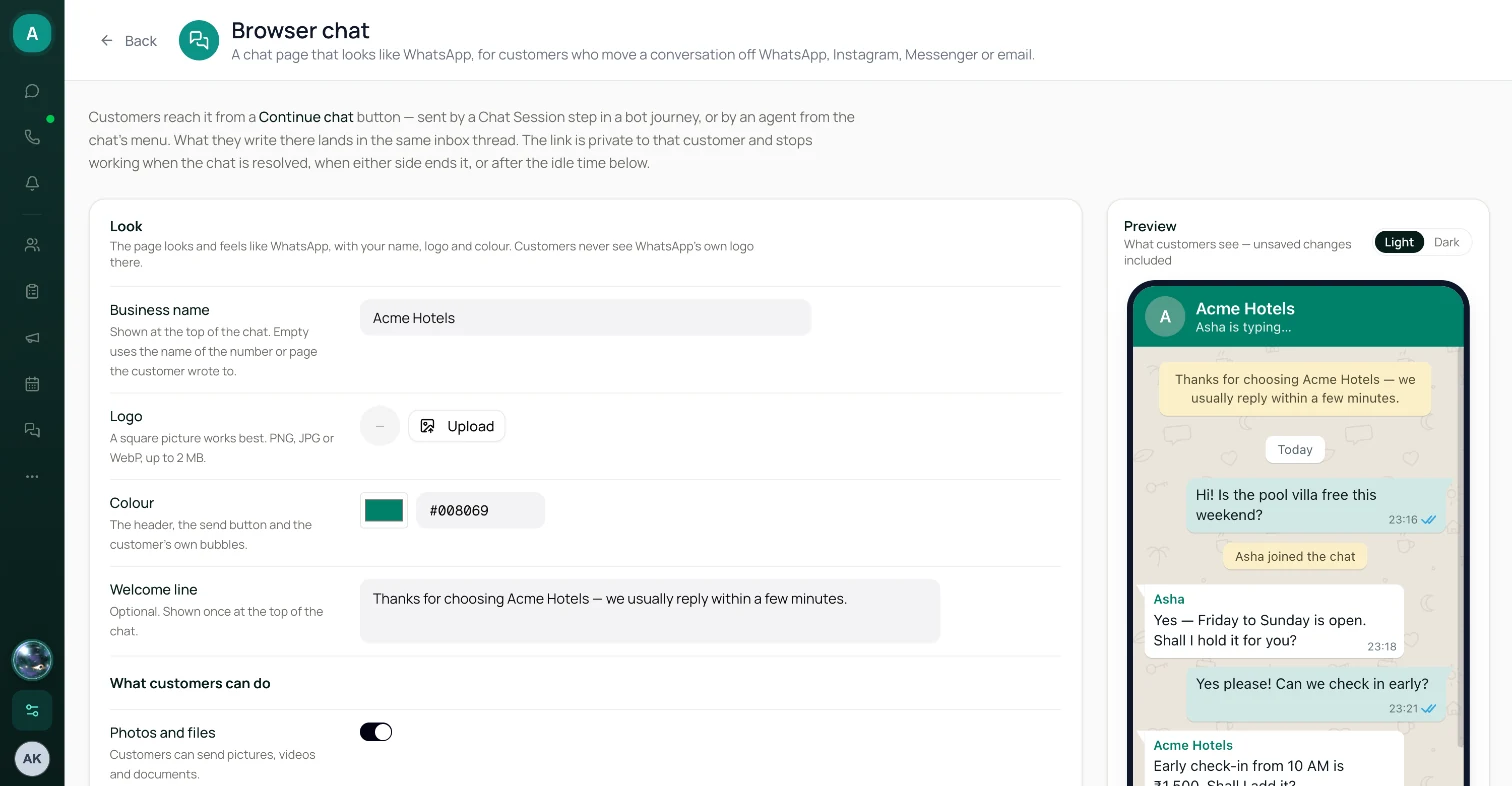
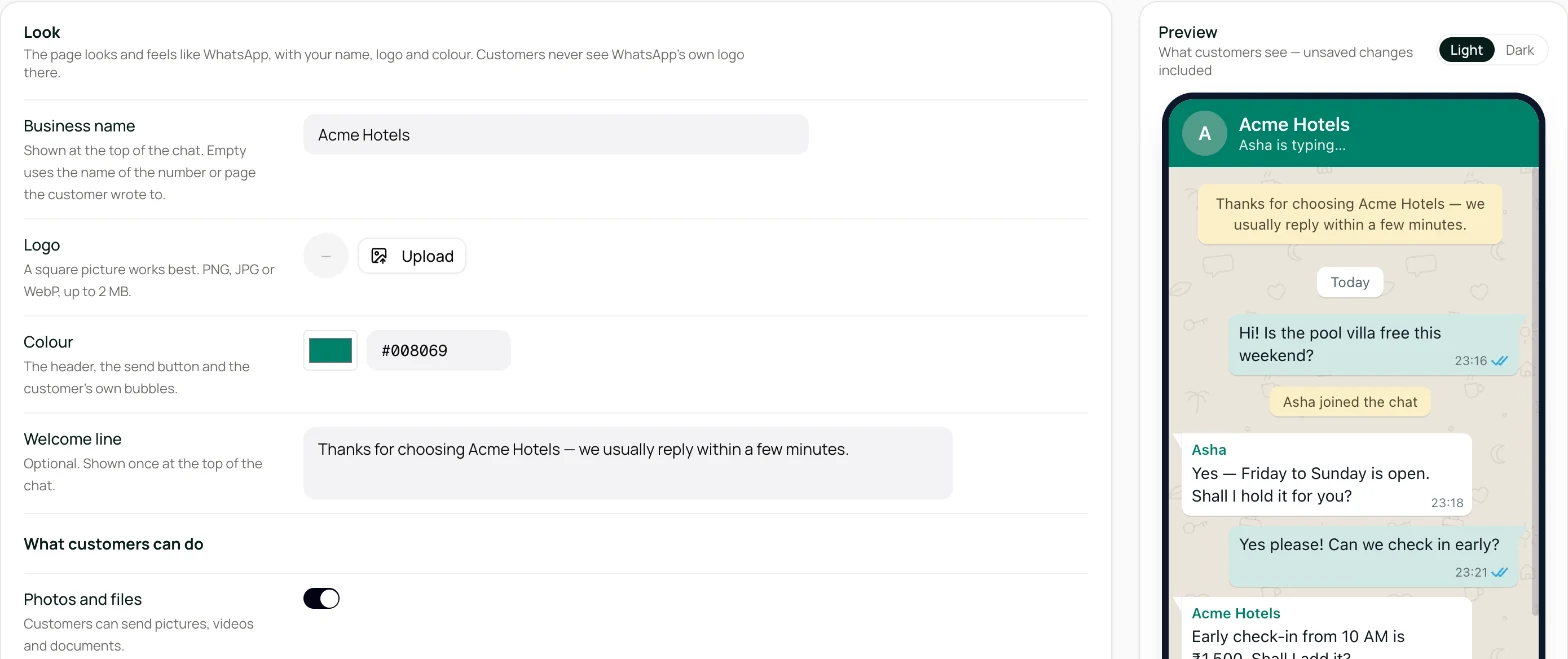
Under Look, set Business name, upload a Logo (a square PNG, JPG or WebP, up to 2 MB), pick a Colour and, if you like, a Welcome line. The preview on the right shows the result in light and dark mode. Click Save.
Step 3 — Decide what customers can do
Under What customers can do, switch photos and files, voice messages, GIFs, chat download and the reply sound on or off, and set the Largest file. All are on by default.
Step 4 — Prepare WhatsApp (WhatsApp Official only)
In WhatsApp template for links after 24 hours, click Create template for each WhatsApp account. WhatsApp usually approves it within minutes. You can skip this step: an agent can create it the first time it's needed.
Step 5 — Send a link
Open a WhatsApp, Instagram, Messenger or email chat in the inbox → ⋮ → Send browser chat link → Send link. To let a bot do it, add a Chat Session step to a journey instead.
You should now see: a Browser chat strip above the reply box — "link sent — waiting for the customer to open it and write".
Step 6 — Reply in the browser
When the customer writes on the page, the strip shows whether they're on it right now, and Reply on switches to Browser chat. Reply as usual.
Step 7 — Check the cost
Settings → Invoices → Browser chat shows every browser chat this month and what it cost.
How it works
sequenceDiagram
    participant Customer
    participant Channel as WhatsApp / Instagram / Messenger / email
    participant Page as Browser chat page
    participant Inbox as Lodgestory inbox
    Inbox->>Channel: Message with a "Continue chat" button (agent or bot journey)
    Channel->>Customer: Customer taps the button
    Customer->>Page: Page opens with the conversation so far
    Customer->>Page: Writes a message
    Page->>Inbox: Lands in the same chat, marked "Browser"
    Inbox->>Page: Agent or bot replies into browser chat
    Note over Page,Inbox: Closes when the chat is resolved, either side ends it,<br/>nobody writes for the idle time, or a newer link is sent
The link message itself is an ordinary message on the customer's channel (on WhatsApp, Meta charges for it as usual). From the customer's first message on the page, the conversation runs in the browser until it closes. Afterwards everything stays in the inbox thread, and the customer can carry on on their channel.
Features in depth
What the customer sees
The page opens with the conversation since the chat was last resolved, including earlier browser chat messages. Internal notes, system lines, calls, one-time-passcode templates and the link messages themselves are never shown.
- Header — your logo (or the first letter of your name) and business name. If Business name is empty, the name of the number or page the customer wrote to is used.
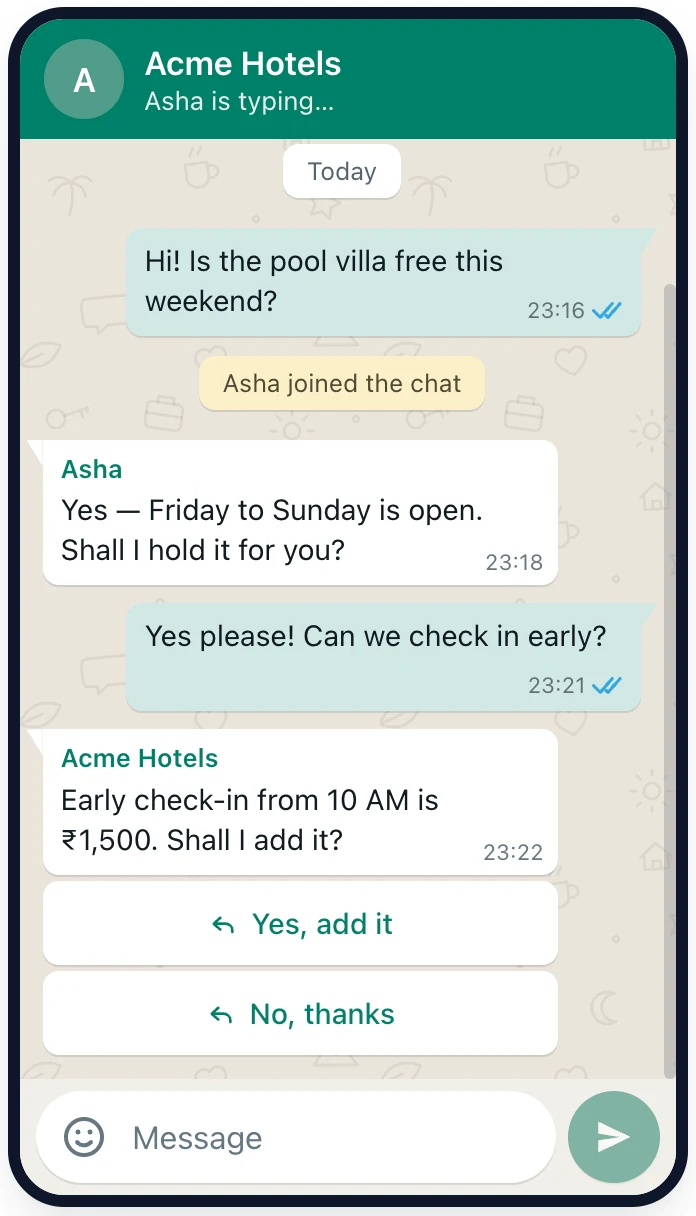
- Ticks on the customer's messages — a clock while sending, one grey tick when sent, two grey ticks when it reached your inbox, two blue ticks once a teammate has the chat open on screen. A message that failed shows "Not sent. Tap to retry."
- Names and typing — each agent's first name above their messages, "Asha joined the chat" the first time an agent replies, and "Asha is typing…" (or "typing…" for the bot) in the header.
- Writing — text up to 4,096 characters with WhatsApp-style formatting (*bold*, _italic_, ~strike~), emoji, GIFs, replies to a specific message (swipe right on a phone), one photo, video, audio file or document at a time, and voice messages up to 10 minutes.
- Bot messages — buttons and lists work as on WhatsApp. Only the newest message's buttons can be tapped.
- Menu (⋮) — Download chat saves the conversation as a text file (times in UTC). End chat asks "End this chat?" and closes the browser chat.
- Notices — "This chat will close soon due to inactivity. Send a message to keep it open." in the last five minutes before the idle time runs out, and a notice when the phone goes offline.
- In the background — the tab title shows the number of new replies, with an optional short sound.
The page follows the phone's light or dark mode, works in the in-app browsers of WhatsApp and Instagram, is in English, and shows times in the customer's own time zone. It isn't indexed by search engines and carries no tracking.
Sending a link from the inbox
Where: any one-to-one WhatsApp, Instagram, Messenger or email chat → ⋮ → Send browser chat link. On WhatsApp Official, the closed-window panel above the reply box has the same button.
- Check the Message, Button text and Close after (minutes without messages). They start from the Link defaults in settings.
- Click Send link. The customer gets one message on their channel with your button.
- While a link is waiting or a browser chat is open, a new link replaces it. The dialog says so first. If the customer is writing in the browser right now, no new link is sent — reply there instead.
- On email chats, everyone on the thread, including CC, receives the link.
- After WhatsApp's 24-hour window, the link goes inside a template — see below. Instagram and Messenger have no templates, so nothing can be sent until the customer writes again.
Sending a link from a bot journey
The Chat Session step sends the link and waits. It takes Continued in browser when the customer writes their first browser message (that message is the input for the next step), or Replied on channel when they answer on the channel instead, which closes the link at once. Where browser chat can't be used — WhatsApp groups, Web Chat, Instagram comment threads — it goes straight to Replied on channel without sending anything.
The step has its own message and button text; the settings' Link defaults apply to agents' links only. Every field, rule and the test-chat behaviour are in Bot Journeys → Chat Session.
In the inbox
- The strip above the reply box — BROWSER CHAT with a presence dot and one of: "link sent — waiting for the customer to open it and write", "the customer is on the page", "the customer left the page 3 minutes ago", or "the customer is away from the page", plus "closes in 25 min without messages". Its button is Cancel link while the link is waiting and End browser session once the customer has written. Ending closes only the browser chat, never the conversation.
- Reply on — appears once the customer has written in the browser. It starts on Browser chat while the customer is on the page and on the channel while they're away. Once you type or pick, it stays where you put it. Templates, scheduled messages and email CC/BCC are channel-only, so they're hidden while Browser chat is selected. Attachments work in both.
- If a browser chat closes before your reply arrives, the reply isn't sent. The bubble offers Send on WhatsApp (or the chat's channel) and Discard. Only the text is re-sent.
- Marks — a Browser mark next to the time on every message that went through the page, in both directions, and a 🌐 before the chat-list preview. The link message shows as a Browser chat link chip: the customer's private link is never shown to agents.
- What the customer is typing — you see their draft before they send it, as on Web Chat.
- Thread notes — the thread records what happened: "Customer continued in the browser chat", "Browser chat closed after 30 minutes without messages", "The customer ended the browser chat", "Browser chat replaced by a newer link" and so on. Only your team sees them.
Automatic replies follow the customer. The bot, AI Copilot autopilot, the away message, a journey's hand-over message and an automation's Send message (text) go into browser chat while the customer's latest message came from there, and on the channel otherwise. Templates and surveys always go on the channel.
WhatsApp's 24-hour window doesn't move. Messages in browser chat don't open or extend WhatsApp's 24-hour window. After a day of browser-only chatting, a message on WhatsApp needs a template again.
Settings
Settings → Connections → Web widget → Browser chat. Owners and Admins can edit. Everyone else sees the settings read-only.
| Setting | Default | Notes |
|---|---|---|
| Business name | Empty | Up to 60 characters. Empty uses the name of the number or page the customer wrote to. |
| Logo | None | A square PNG, JPG or WebP, up to 2 MB. |
| Colour | WhatsApp-like green (#008069) | The header, send button and the customer's own bubbles. Warns when white text would be hard to read on it. |
| Welcome line | Empty | Up to 200 characters, shown once at the top of the chat. |
| Photos and files | On | Pictures, videos and documents. |
| Voice messages | On | |
| GIFs | On | A GIF search next to the emoji picker. |
| Download the chat | On | Saves the conversation as a text file. |
| Sound | On | A short sound when a reply arrives while the page is in the background. |
| Largest file | 10 MB | 1–50 MB. |
| Link defaults → Message | "Let's continue our chat here — tap the button below to open it." | Up to 1,024 characters. Agents' links only. |
| Link defaults → Button text | Continue chat | Up to 20 characters. Agents' links only. |
| Link defaults → Close after | 30 minutes | 5 minutes to 24 hours. Applies to links sent after the change. |
| WhatsApp template for links after 24 hours | — | One row per WhatsApp account — see below. |
After WhatsApp's 24-hour window
Once a customer hasn't written on WhatsApp for 24 hours, WhatsApp only delivers messages inside an approved template. Lodgestory has its own template for the link, so you don't have to build one.
- The Continue chat template. Create it in the WhatsApp template for links after 24 hours card, or let an agent create it from Send browser chat link the first time it's needed. Lodgestory submits it on that number's WhatsApp account, and every number on the same account shares it. WhatsApp usually reviews it within minutes; Check again refreshes its status.
- What the customer gets: "We're following up on your recent message to us. Tap the button below to continue the conversation." with a Continue chat button. It appears in WhatsApp Templates as
lodgestory_browser_chat_v1(later versions_v2,_v3). - Always a utility message. Lodgestory sends links in it only while WhatsApp lists it as a utility message — ₹0.115 to a customer in India, against ₹0.8631 for a marketing one. If WhatsApp files it as marketing, Lodgestory stops using that version and submits its next wording straight away. After a rejection or a pause, the card and the dialog offer Submit new wording. If WhatsApp turns down every wording, you can ask for a review in WhatsApp Manager within 60 days of its decision, or use one of your own templates.
- Names are checked first. Lodgestory takes over a Continue chat template that already exists on the account, and otherwise moves to the next free version number. If you delete the template in WhatsApp Manager, Lodgestory creates the next version the next time it's needed.
- Your own template instead. Use one of my own templates instead lists your approved templates — from every number on the WhatsApp account — that have a URL button whose link is exactly
https://lodgestory.com/chat/{{1}}(or your own domain followed by{{1}}). Lodgestory fills in the customer's private link when it sends the template.
| Template status | What it means |
|---|---|
| Approved by WhatsApp as a utility message | Links go out in it. |
| Waiting for WhatsApp's review | Submitted; links go out in it once it's approved. |
| WhatsApp files it as marketing | Not used. Submit new wording tries the next wording. |
| WhatsApp rejected it / paused it | Not used. Submit new wording tries again. |
| Not created yet | Create template submits it. |
Your own link address
Links look like https://lodgestory.com/chat/…. You can send them on your own domain instead, such as chat.yourhotel.com. One domain per workspace, and it can't be your survey domain.
- Under Link address, enter the hostname (no
https://, no path) and click Connect domain. - Add the two records the page shows at your DNS provider:
- a TXT record named
_lodgestory-challenge.chat.yourhotel.com, which proves you own the domain; - a CNAME record for
chat.yourhotel.com, which points it at your browser chat. If your DNS is on Cloudflare, set this record to DNS only (grey cloud), not Proxied.
- a TXT record named
- Wait a few minutes (some providers take up to an hour), then click Check now.
Lodgestory then sets up the secure certificate by itself and keeps checking for up to 72 hours. The status moves from Pending verification to Ownership verified, Provisioning certificate and Active.
- Once it's active, new links use your domain. Links already sent on
lodgestory.comkeep working. - Lodgestory's Continue chat template always carries the
lodgestory.comaddress. Your own templates carry whichever address they were approved with. - Disconnect stops links on your domain at once. New links go out on
lodgestory.comagain.
When a link stops working
A link belongs to one customer and one conversation. It stops working when:
- the chat is resolved, by an agent or a workflow;
- an agent clicks End browser session (or Cancel link), or the customer taps End chat;
- nobody writes in browser chat for the idle time. The clock starts when the link is sent and restarts with every browser chat message from either side. Opening the page or writing on the channel doesn't restart it, so a link nobody writes in closes after the idle time;
- the customer answers on the channel while a bot journey is waiting at a Chat Session step;
- a newer link is sent;
- the channel is removed from Lodgestory, or the account is suspended.
A closed browser chat never reopens: a new link is the only way back, and it shows the conversation since the last resolve again. A customer who opens an old link sees "This chat has ended", the reason, and a button back to their channel — Continue on WhatsApp, Continue on Instagram, Continue on Messenger or Reply by email. If the chat ends while the page is open, the messages stay on screen, read-only.
Pricing
From 1 October 2026 WhatsApp charges for every reply a business sends, including replies inside the 24-hour window — ₹0.115 per reply to a customer in India, for example (other countries have their own rates).
- A browser chat started from a WhatsApp Official chat costs 25% of WhatsApp's reply rate for the customer's country, for each of your replies that reached the page.
- Browser chats started from Instagram, Messenger, Email or WhatsApp Unofficial are free.
- The first 100 billable browser chats each calendar month are free. Only a chat that would cost something uses one of the 100.
- Nothing is charged for a link nobody used, a browser chat with no replies from you, the customer's own messages, or messages on the channel.
- The customer's country comes from their phone number, or else from your WhatsApp number. If WhatsApp has no rate for that country, the chat shows as Not priced and isn't charged.
- The amount is fixed when the browser chat closes. Months follow India time.
Worked examples for a customer in India (the link message is itself a WhatsApp reply, charged by Meta, and is counted):
| Your replies | On WhatsApp | In browser chat |
|---|---|---|
| 20 | 20 × ₹0.115 = ₹2.30 | ₹0.115 link + 20 × ₹0.02875 = ₹0.69 |
| 5 | 5 × ₹0.115 = ₹0.575 | ₹0.115 link + 5 × ₹0.02875 ≈ ₹0.26 |
| 1 | ₹0.115 | ₹0.115 link + ₹0.02875 ≈ ₹0.14 — WhatsApp is cheaper |
From two replies on, browser chat costs less, whatever the country. WhatsApp gives each business number its first 1,000 replies a month free, and browser chat doesn't count against those. While your numbers stay under 1,000 replies, replying on WhatsApp costs nothing and browser chat won't save you money.
Usage
Settings → Invoices → Browser chat (Account Owner, Finance and Admins; for Admins the tile is called WhatsApp charges) shows one month at a time, for the last 12 months:
- Browser chat charges for the month, and the Free sessions meter ("23 of 100 used").
- Links sent, chats continued in the browser, charged and free chats, and replies delivered.
- A row per browser chat: who it was with, the channel and how it started (Bot journey, Sent by an agent, Sent in a template), when it started, whether the customer continued, their country, replies, billing status (Free channel, Not continued, Open, Free session, Charged, No replies, Not priced), the amount and why it ended.
Open browser chats have no amount yet; theirs is added when they close. Browser chat appears as its own Browser Chat Usage line on your Lodgestory invoice.
Roles and permissions
| Action | Account Owner | Admin | Member |
|---|---|---|---|
| See browser chat settings | Yes | Yes | Yes (read-only) |
| Change settings, connect or disconnect a custom domain | Yes | Yes | No |
| Create the Continue chat template from settings | Yes | Yes | No |
| Send a browser chat link (and create the template from that dialog) | Yes | Yes | Yes |
| Reply in browser chat, end a browser chat | Yes | Yes | Yes |
| See browser chat usage | Yes | Yes | No — unless they have Finance access |
Agents can send links and reply in the chats they can open in the inbox.
Connections
- Bot Journeys — the Chat Session step moves a customer to the browser, and later steps answer there. An AI Agent placed right after it answers their first browser message.
- Unified Inbox — browser chat messages live in the customer's existing thread, so assignment, tickets, notes and resolving work as usual. Resolving the chat closes the browser chat.
- WhatsApp charges — browser chat's usage sits next to WhatsApp's own charges, and its price follows WhatsApp's reply rate.
- WhatsApp Templates — the Continue chat template appears there, and your own templates with a browser chat link button can carry the link.
- Automations — Send message text follows the customer into browser chat. No automation action sends or ends a browser chat link.
- Webhooks — browser chat messages arrive as ordinary
message.received/message.sentevents withvia: "browser_chat". - Web Chat — the website widget is a separate channel with its own threads. You don't need it for browser chat.
Limits a user will run into
| Limit | Value |
|---|---|
| Open browser chats per conversation | 1 |
| Idle time | 5 minutes to 24 hours (default 30). A change applies to links sent after it. |
| Customer's message | 4,096 characters |
| Customer's files | One at a time, up to the Largest file setting (1–50 MB, default 10 MB) |
| Voice message | Up to 10 minutes (sent automatically at 10 minutes) |
| Customer's sending rate | 30 messages and 10 files a minute |
| Link message / button text | 1,024 / 20 characters |
| Business name / welcome line | 60 / 200 characters |
| Custom domains | 1 per workspace |
| Free billable chats | 100 per calendar month |
| Chat download | Up to 10,000 messages, times in UTC |
Changes to your name, logo or link address can take up to five minutes to reach browser chats that are already open.
Errors and FAQ
Errors you might see
| You see | Likely reason | What to do |
|---|---|---|
| "Browser chat works in one-to-one chats on WhatsApp, Instagram, Messenger and email — not in groups, Web Chat or comment threads." | The chat is a group, a Web Chat or a comment thread | Reply on the channel |
| "The customer is already chatting in the browser — reply there instead of sending a new link." | The customer's latest message came from the page | Reply with Reply on → Browser chat |
| "…24-hour reply window is closed, so no message can be sent until the customer writes again." | Instagram or Messenger window closed | Wait for the customer to write |
| "WhatsApp is still reviewing the Continue chat template." | The template is pending | Click Check again in a few minutes, or use your own template |
| "This template has no browser-chat link button…" | Your template's URL button isn't your link address followed by {{1}} | Pick another template or use the Continue chat template |
| Browser chat ended · Send on WhatsApp · Discard under your reply | The browser chat closed before your reply arrived | Send it on the channel or discard it |
| "Enter a bare hostname like chat.yourhotel.com (no https:// or path)." | The domain box has a URL in it | Enter just the hostname |
| "This hostname is already your survey domain…" | Browser chat and surveys need different domains | Use another subdomain |
| "This domain is already connected to another organisation." | The domain is in use elsewhere | Disconnect it there first |
| "TXT record not found yet — DNS changes can take a few minutes" | DNS hasn't updated yet | Wait, then Check now |
| "Still waiting for the certificate after 72 hours. Check the CNAME record, then click Check again." | The CNAME record is wrong or proxied | Fix the record (DNS only on Cloudflare), then Check again |
What customers can see on the page:
| Customer sees | Why |
|---|---|
| "This chat link isn't available" | The link is incomplete or unknown |
| "This chat has ended" with "This chat closed after a period of inactivity.", "A newer chat link was sent to you.", "The business has closed this conversation." and similar | The browser chat closed — see When a link stops working |
| "This file is too large. The limit is 10 MB." | Over the Largest file setting |
| "You're sending messages too quickly. Please wait a moment." | Over 30 messages or 10 files a minute |
| "This voice message can't play in this browser." | Some browsers (Safari on iPhone) can't play voice messages recorded elsewhere; a download is offered instead |
| "Microphone access was blocked…" | The browser blocked the microphone |
FAQ
Do I need the website widget?
No. Browser chat works on its own; only its settings are on the Web widget page.
Does opening the link keep the browser chat open?
No. Only messages in browser chat, from either side, restart the idle clock. A link nobody writes in closes after the idle time, counted from when it was sent.
Why does WhatsApp need a template again when we were just chatting?
Messages in browser chat don't reopen WhatsApp's 24-hour window. Reply in browser chat, or send a template on WhatsApp.
Can an automation send a browser chat link?
No. Links come from a Chat Session step in a bot journey or from an agent. An automation's Send message text does follow the customer into browser chat.
Can I send a link or reply in browser chat from the mobile app?
Not yet. The app shows the customer's browser chat messages, but it can't send links, and its replies go on the channel. Use the web inbox.
Why did my Chat Session step go straight to "Replied on channel"?
See Bot Journeys → FAQ.
Is the link safe to share?
The link is the customer's key to the conversation: anyone who has it can read the chat and write in it until it closes. That's why it's never shown to agents, and why it stops working when the browser chat closes. Ask customers not to forward it.
Does it cost anything on Instagram or Messenger?
No. Only browser chats started from a WhatsApp Official chat are billed.
API
- Messages carry
via. In the partner API and the Webhooks API reference, a message that went through browser chat hasvia: "browser_chat"; other messages havenull. Customer messages on the page arrive asmessage.receivedand your replies asmessage.sent. There are no separate browser chat events. - The link is never exposed. The message that carried the link appears with the stand-in
https://browser-chat-link.lodgestory.invalid/secretin place of the real link. - Sending stays on the channel. Messages sent through the partner API or the MCP tools always go on the channel. Sending a link, ending a browser chat or replying into it is only possible from the inbox.
Changelog
- Oct 2026 — Browser chat launched: the WhatsApp-style page with your name, logo and colour; Send browser chat link and the Reply on switch in the inbox; the Chat Session bot journey step; the Continue chat template for links after 24 hours; your own link domain; and the Browser chat usage tab under Invoices.
Related modules and next steps
- Bot Journeys → Chat Session — move customers to browser chat automatically.
- WhatsApp charges — what WhatsApp charges you, and why browser chat saves money.
- Unified Inbox — answering browser chat alongside every other channel.
- WhatsApp Templates — where the Continue chat template lives.
Updated 18 minutes ago