
Channel Runtime Config
Lodgestory CRM › Settings → Connections → Configuration → Channel runtime config
Tune the per-channel automation knobs that live underneath every inbound message — which workflow attaches to a new chat, when the bot journey should step aside for a human, and how aggressively replies go out.
TL;DR
- What it is — the per-channel modal where you give the channel a friendly label (shown on every chat row), wire up auto-attach state machines (a workflow attaches itself when a new chat arrives or an old one revives), set the staleness window for "this chat is reviving," tune the agent-recency window the bot journey checks before replying, and tune outbound send pacing.
- Who it's for — Account Owners and Admins. End-users never see this surface; the rules run themselves on every inbound message.
- Top outcome — every new chat lands on the right workflow without a human picking it; reviving an old chat re-attaches a fresh workflow run; the bot stops replying once a real agent has spoken.
At a glance
| Plan tiers | All paid tiers. |
| Who can configure | Account Owners and Admins. |
| Where it lives | Settings → Connections → Configuration → Channel runtime config button on a channel row. Each channel has its own config. |
| Channels supported | Every inbound channel: WhatsApp Official, WhatsApp Unofficial, Instagram, Facebook Messenger, Email, Web Chat. |
| Integrations | Reuses Workflow Lifecycle Stages (the state machines you attach), Bot Journeys (the agent-recency knob feeds the journey decision), and the unified inbound listener that already routes every channel. |
| Top limits | Stale threshold 1–4320 minutes (1 minute to 3 days). Agent-recency window 0–1440 minutes. |
| API | Yes — partner API for read and update. |
How to find it
Settings → Connections → Configuration → Channel runtime config (per-channel button).
Direct URL for the configuration page: https://lodgestory.com/crm/settings/connections/configuration
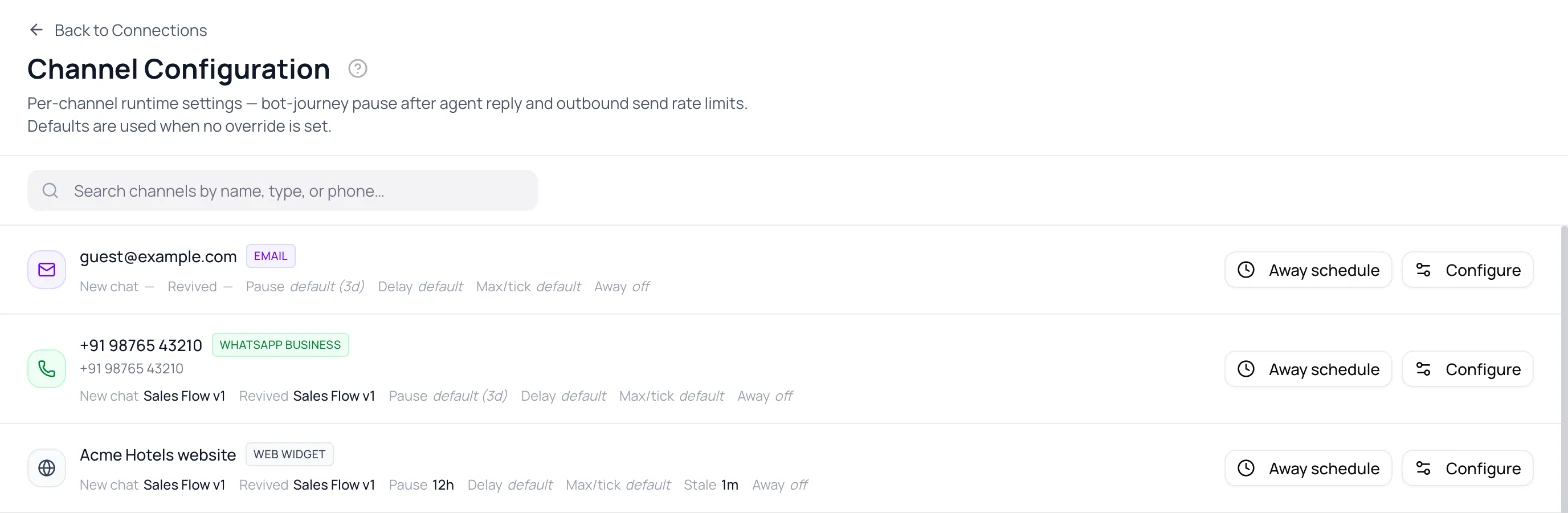
The Configuration page lists every connected channel as a row with two buttons. Channel runtime config opens this modal; Away schedule opens the Away Schedule modal.
[SCREENSHOT: runtime-config-modal.png — runtime-config modal with state-machine pickers, stale slider, agent-recency, send-rate]
What is Channel Runtime Config?
The problem it solves
Inbound chat is a stream of "what should happen now?" decisions. This is a new contact — should a workflow attach? They messaged us 3 weeks ago — does that count as a fresh conversation? An agent replied 2 minutes ago — should the bot keep replying anyway? Every product hard-codes some of these and forces you to live with it.
Channel Runtime Config exposes those decisions as per-channel knobs. Each channel can have its own pair of workflows for new vs revived chats, its own definition of "stale enough to count as a revival," its own agent-recency window before the bot steps aside, and its own send-rate pacing. Behaviour is consistent across WhatsApp, Web Chat, Email, Instagram, and Messenger because they all flow through the same listener.
What you get
- A workflow attaches itself to every new chat. Pick a Workflow Lifecycle Stages machine as the "new chat" trigger. The first time someone messages, the chat lands on that workflow's starting stage automatically. No human has to pick.
- A second workflow can attach when an old chat revives. Pick a different (or the same) workflow for the "revived chat" trigger. When a contact who messaged you weeks ago reaches out again, you can route them onto a follow-up workflow distinct from cold inbound.
- You decide what "stale" means. A guest who messages you twice within five minutes is the same conversation; a month later they're a different one. The stale threshold is the dial: 1 minute to 4,320 minutes (3 days). When the gap since the last message is below the threshold, the chat is considered live and no re-attach happens.
- The bot knows when to back off. Once a human agent replies, the bot journey skips for the agent-recency window (0 means never, default 180 minutes). Combined with the Away Schedule, this means agents can take a chat without the bot interrupting, and the away-message still fills the gap on subsequent off-hours messages.
- Outbound pacing. A small delay between sends and a max-per-tick limit prevent the bot journey or AI autopilot from blasting a guest with a wall of messages in 200ms.
- A friendly channel label. Give the channel a human name — "Front Desk", "Bookings WA", "Support Email" — instead of the raw channel type or phone number. It shows in small text directly below the avatar on every chat row in the unified inbox so agents instantly know which line a conversation came in on. Max 40 characters; leave it blank to fall back to the channel type. Stored as a first-class field, so it survives provider reconnects (unlike anything kept in provider metadata).
How it's different
- Per channel, not per organisation. WhatsApp can have a different stale threshold than Web Chat. Email can use a separate revival workflow than Instagram. Each channel is its own decision.
- No human in the auto-attach loop. The workflow attaches itself the first time the channel sees a message from a contact. You don't pick a workflow for each chat by hand.
- Append-only history. Every state-machine attach, transition, and revive is a fresh row in
WPCrmChatsStates. Nothing mutates; you can replay the entire timeline of a chat's workflow journey. - The bot-journey gate is explicit. The agent-recency window is a single integer per channel, not a global setting buried in a settings tree.
Customer scenarios
- Front-desk operator with two workflows. New inbound on WhatsApp attaches a Front-desk Triage machine; a contact who messaged 6 weeks ago reaches out again — that's a revive, attaches a Returning Guest Follow-up machine. Both states show up in the inbox card.
- Aggressive bot journey, then back off when an agent steps in. Web Chat has agent-recency 60 minutes. The bot answers everything for an hour after an agent's last reply, then resumes its automation. If the agent comes back in 30 minutes, the bot stays out of the way.
- Fast-cadence email channel. A long bot-journey email sequence is split into multiple sends. With send-delay 800 ms and max-per-tick 3, three emails go out in quick succession without overwhelming the recipient's mail provider's spam filters; the rest queue for the next tick.
- Instant-revive testing. During QA, the team sets stale-threshold to 1 minute to easily test the revival flow. They send a message, wait two minutes, send another — the second one triggers the revive workflow instead of being treated as part of the same conversation.
How it fits with the rest of Lodgestory
- Workflow Lifecycle Stages — provides the workflows that auto-attach. The runtime config picks which workflow to use for which trigger.
- Bot Journeys — the agent-recency knob is read by the live-session decision (
live-session.service.ts) to skip the bot when a real agent recently replied. - Away Schedule — the sister modal. Auto-attach runs even when the channel is in off-hours; the away-message and auto-attach are independent.
- Connections — runtime config is configured per channel after the channel itself is connected.
- Home / Unified Inbox — the workflow stage badge on each conversation card is set by these auto-attach rules.
Core concepts
| Term | What it means |
|---|---|
| Auto-attach | The behaviour that drops a fresh WPCrmChatsStates row onto a chat the first time it qualifies for the new chat or revived chat trigger. |
| New chat trigger | Fires when a contact's first-ever message on this channel arrives (no prior WPCrmConversations rows for this wpChatId). |
| Revived chat trigger | Fires when an existing chat's most-recent prior message is older than the stale threshold — and also when an inbound message reopens a Resolved & closed chat that has no active workflow, whatever the gap. |
| Stale threshold | Minutes since the last message that count as "stale enough to be a revive." Below threshold, the chat is treated as live and no re-attach happens. Default 4,320 (3 days). Range 1–4,320. |
| Agent-recency window | Minutes since the last agent reply during which the bot journey skips automatically. Default 180. Set to 0 to disable. |
| Channel label | An optional human name for the channel, shown on every chat row in the inbox. Falls back to the channel type when unset. Max 40 chars. Stored as its own field — survives provider reconnects. |
| Send delay | Milliseconds the journey/autopilot waits between consecutive outbound messages on this channel. |
| Max-per-tick | Maximum number of outbound messages to send in one scheduler tick before yielding to the queue. |
| Bot user | The user account the auto-attached state-machine row is attributed to. Resolved as any user with the CRM_BOT role in the organisation; failing that, auto-attach skips. |
Quick Start — wire up auto-attach for a WhatsApp channel in 5 minutes
Step 1 — Open Configuration
Settings → Connections → Configuration.
Step 2 — Click Channel runtime config on the channel row
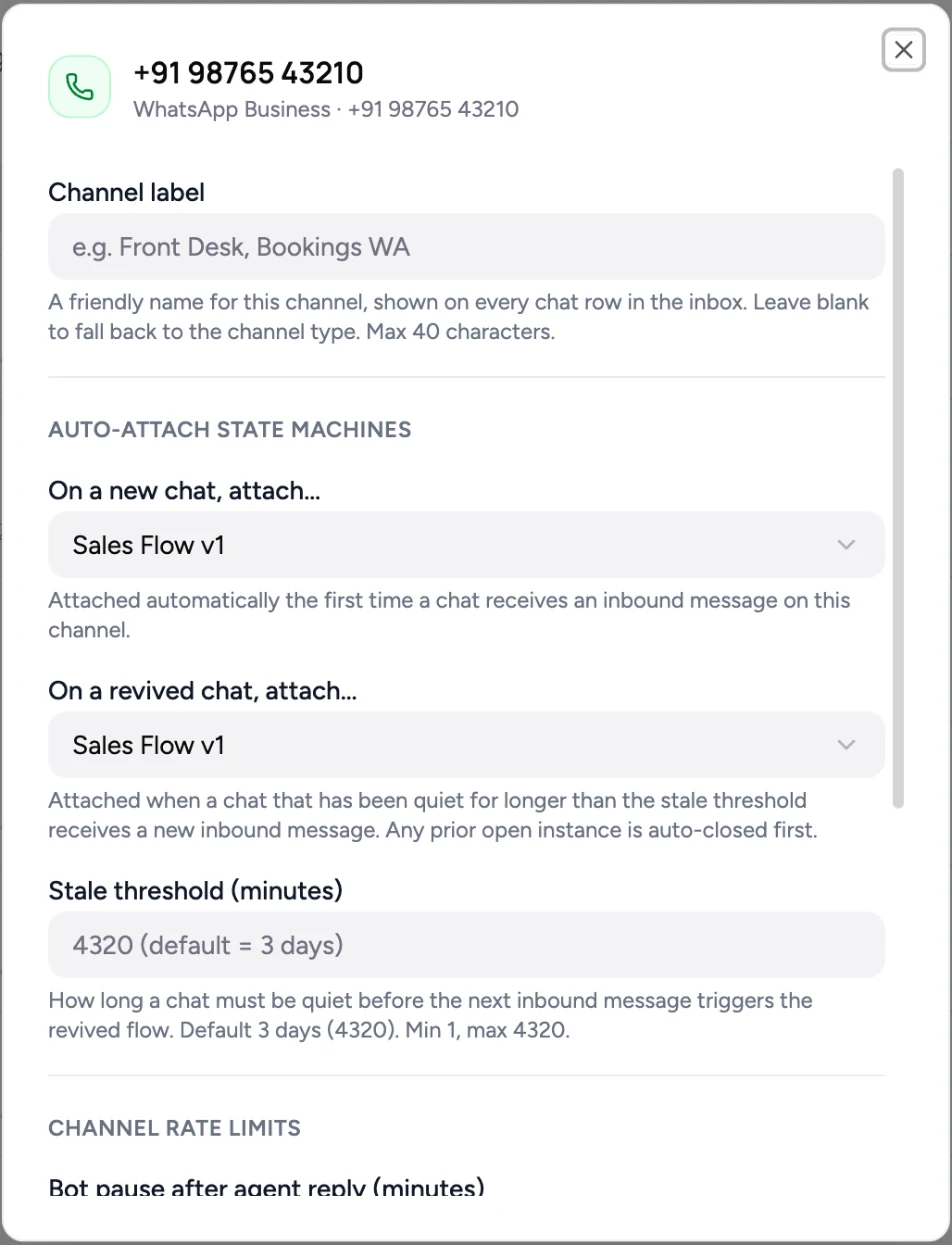
Step 3 — Pick the workflow for new chats
Choose a Workflow Lifecycle Stages machine in the New chat workflow dropdown. The first time anyone messages this channel, that workflow's starting stage will attach.
Step 4 — Pick the workflow for revived chats
Same picker, separate field. Can be the same workflow as new chats (a single starting stage every time) or a different one (a follow-up workflow for returning contacts).
Step 5 — Set the stale threshold
Default 4,320 minutes (3 days). For testing or aggressive revival, lower it; for long-running B2B conversations, raise it.
Step 6 — Tune agent recency and send rate (optional)
Default agent-recency is 180 minutes — the bot journey skips for 3 hours after an agent reply. Default send-delay and max-per-tick are sane for most workloads; tune only if you see pacing issues.
Step 7 — Save
The next inbound message on this channel runs the new rules. Existing chats are unaffected by the change — the rules apply going forward.
What's next
- Configure each of your channels — they're independent.
- Build the workflows you want to auto-attach in Workflow Lifecycle Stages.
- Pair with Away Schedule for full off-hours coverage.
How it works
When auto-attach fires
Every inbound message on every channel emits the wp.crm.chat.inbound event. A single listener (StateMachineAutoAttachService.onChatInbound) handles the auto-attach decision:
flowchart TD
    A[Inbound persisted] --> B[wp.crm.chat.inbound emitted]
    B --> C[loadChannelConfig]
    C --> D{newSM or revivedSM set?}
    D -- no --> Z[Return — channel not configured]
    D -- yes --> E{CRM_BOT user exists in org?}
    E -- no --> Z
    E -- yes --> F[Find priorMsg]
    F --> G{priorMsg exists?}
    G -- no --> H[isNewChat = true]
    G -- yes --> I{elapsed >= stale?}
    I -- no --> Z
    I -- yes --> J[isRevival = true]
    H --> K[Acquire Redis lock]
    J --> K
    K -- contended --> Z
    K -- acquired --> L[Idempotency check — any active row for this machine?]
    L -- yes --> M[Return — already attached]
    L -- no --> N[Resolve initial node]
    N --> O[Transaction — close prior actives + insert new row]
Five guards, in order:
- Channel has a config. No
OrganisationWpChannelsrow → return. NonewChatStateMachineIdand norevivedChatStateMachineId→ return. - Org has a CRM_BOT user. The new state-machine row needs a user to attribute to (
attachedByUserId). Lookup isUser_Roles.findFirst({ organisationId, role: 'CRM_BOT' }). None → return with a debug log. - Trigger qualifies. Find the most-recent prior message on this chat. If none → new-chat trigger. If one and the gap is below stale → return (live conversation). If above → revival trigger.
- Acquire Redis lock on
lock:auto-attach:{channelId}:{wpCrmChatsId}for 30 seconds — protects against duplicate attaches under message bursts. - Idempotency check. Look for any
isActive=truerow for the same(chat, machine). If one exists, the machine is already attached — return.
If all five pass, run the close-prior + create-new transaction (next section).
Append-only history with the close-priors invariant
Every state-machine event on a chat is a fresh row in WPCrmChatsStates — the table is append-only by design. To keep the isActive flag truthful, every writer follows this invariant:
At most one
isActive=truerow exists per(wpCrmChatsId, organisationStateMachineId)at any time.
Concretely, a writer that inserts a new state-machine row first closes any prior isActive=true rows for the same (chat, machine) in the same transaction. The four writers, all consistent:
| Writer | When it runs | What it does |
|---|---|---|
| Auto-attach (new chat) | First inbound on a chat | Defensive close (none expected) + insert initial-node row |
| Auto-attach (revived chat) | Inbound on a stale chat | Close any prior actives for all machines on this chat (distinct organisationStateMachineId) + insert new initial-node row |
| Manual attach (Settings → conversation → attach) | Admin action | Defensive close + insert initial-node row |
| State transition (agent picked next stage) | Agent action | Close prior actives for this (chat, machine) + insert new row at the target node |
| Workflow restart | Admin action on a closed run | Close prior actives + insert new initial-node row |
This invariant is what makes the idempotency check in the auto-attach service (step 5 above) trustworthy: a single findFirst where isActive=true either returns "the chat has an active machine instance, do nothing" or "no active instance, proceed."
If you ever see a chat with two or more isActive=true rows for the same machine in the DB, that's a stale-data bug and the auto-attach idempotency check will start refusing to re-attach on revival until the rows are cleaned up.
Where the bot user comes from
The auto-attach service needs a user ID to write into attachedByUserId on the new state row. It looks up any user in the organisation with the CRM_BOT role:
const botRole = await this.prisma.user_Roles.findFirst({
  where: { organisationId, role: 'CRM_BOT' },
  select: { userId: true },
});
This is independent of bot-journey assignments and the channel's bot-journey live state. Earlier versions tied this to the OrganisationWpChannelBotJourney.botUserId filter on isActive=true, which silently disabled auto-attach when the journey assignment was paused. The current behaviour keeps auto-attach running as long as the org has any CRM_BOT user — which is what most operators expect.
If your org has no CRM_BOT user, auto-attach skips with a debug log: "Skipping auto-attach for channel … : no CRM_BOT user in organisation …". Settings → Team Members → Create service account (Owner/Admin) fixes it — that creates the dedicated CRM_BOT user auto-attach needs.
Stale threshold — the math
Every inbound triggers a most-recent-prior lookup:
const priorMsg = await this.prisma.wPCrmConversations.findFirst({
  where: { wpChatId, organisationId, wpMessageId: { not: thisMessage } },
  orderBy: { createdAt: 'desc' },
  select: { createdAt: true },
});
If priorMsg is null, it's a new chat. Otherwise, elapsed = Date.now() - priorMsg.createdAt. Compare to staleMs = staleChatThresholdMinutes * 60_000:
elapsed < staleMs→ return (live conversation, no re-attach).elapsed >= staleMs→ revival branch.
Boundary inclusivity: exactly staleMs counts as stale (the comparison is strict <).
Agent-recency window — how the bot journey backs off
The agent-recency knob is read inside the bot-journey live-session decision (live-session.service.ts). Every inbound the bot journey runs:
- Look at the most-recent outbound message on this chat from a non-bot user.
- If found and
Date.now() - thatMessage.createdAt < botJourneyAgentRecencyMinutes * 60_000→ skip the journey for this inbound. - If skipped, the listener falls through to AI autopilot, which respects its own
isAutoPilotflag, which (if also disabled or empty) falls through to the away-schedule hook.
So botJourneyAgentRecencyMinutes = 0 means the bot journey never backs off; = 180 (default) means three hours of agent-led conversation before the journey resumes.
Send-rate (delay + max-per-tick)
The journey/autopilot scheduler has a per-channel pacing pair:
sendDelayMs— milliseconds between consecutive outbound messages on this channel. Helps with WhatsApp throttling and reduces "blast" perception on Web Chat.sendMaxPerTick— max messages to send before yielding back to the scheduler. Prevents one chat from hogging a worker.
Both are advisory pacing; nothing fails when limits are hit, the rest just queues for the next scheduler iteration.
Features in depth
Auto-attach on new chats
The first time a contact messages this channel — i.e., no WPCrmConversations rows exist for this wpChatId and organisationId aside from the just-arrived one — the new chat workflow machine attaches. The new WPCrmChatsStates row uses the workflow's type:'initial' node and is isActive=true. If the initial node is also typed 'final' (rare but legal), the row is created already-closed.
Auto-attach on revived chats
When the gap since the last message exceeds the stale threshold, the revived chat workflow machine attaches. Behaviour:
- Find every
isActive=truerow across all machines on this chat (one per machine). - Close all of them with reason "Auto-closed by channel rule: chat revived after stale threshold; new state machine attached."
- Insert one fresh row at the revived workflow's initial node.
The closing step lets you reset the chat's stage cleanly when reviving — the prior workflow's run is over; the new run starts from the top.
Reopened chats count as revived. When a guest message reopens a chat that was Resolved & closed (by an admin, or by a workflow finish under closing rules), the revived-chat workflow also attaches — regardless of the stale threshold — provided the chat has no active workflow on any machine. A chat whose workflow is still active (an admin resolved it to park it) is left alone, and only the revived chat picker qualifies: a channel with just a new chat workflow doesn't start it on every reopen. Previously this happened only when the reopening message was also stale.
Stale threshold tuning
| Use case | Suggested value |
|---|---|
| Conversational support, real-time channels (Web Chat, WA) | 1,440 min (1 day) |
| Default for most operators | 4,320 min (3 days) |
| Long-running B2B / sales | 10,080 min (7 days) — note backend cap is 4,320, so use the cap |
| Aggressive revival testing | 1 min |
The default is "if a contact comes back the next day, treat it as the same conversation; after three days, treat it as fresh." Adjust to your business's natural rhythm.
Agent-recency tuning
| Use case | Suggested value |
|---|---|
| No human escalation in this channel | 0 (bot always runs) |
| Quick-touch agents, bot resumes fast | 30 min |
| Default for most operators | 180 min (3 hours) |
| Long human-led conversations | 480 min (8 hours) |
A very high value effectively pauses the bot the moment any agent replies, until the next day's first inbound after the window closes.
Send-rate tuning
The defaults are calibrated for typical WhatsApp + Web Chat traffic. Tune up if you see provider rate-limit warnings (sendDelayMs higher); tune down if you have a high-volume Email broadcast (lower delay, higher max-per-tick).
Roles and permissions
| Action | Account Owner | Admin | User | Bot |
|---|---|---|---|---|
| View Channel runtime config modal | Yes | Yes | No | No |
| Edit any field | Yes | Yes | No | No |
| Be the auto-attach attribution user | — | — | — | Any user with CRM_BOT role |
Cross-module workflows
A. New channel + auto-attaching workflow
Connect a channel. Build (or pick) a workflow for the new-chat trigger. Open Configuration → Channel runtime config, pick the workflow, save. The first inbound on the channel auto-attaches that workflow.
B. Revival flow distinct from cold inbound
Build two workflows: a Cold Inbound Triage and a Returning Contact Follow-up. Configure the channel to use the first as the new-chat machine and the second as the revived-chat machine. Set stale to your "long enough to be considered a revival" gap (typically 24–72 hours). New contacts land on triage; old contacts revival to follow-up.
C. Bot + human handoff with clean back-off
Channel has a bot journey that handles the easy half of inbound; agent recency is set to 180 min. When an agent jumps into a conversation, the bot stops replying for three hours. After three hours of silence, if the guest sends another message, the bot resumes. Pair with Away Schedule for off-hours coverage in the same gap.
Limits a user will run into
| Limit | Value |
|---|---|
staleChatThresholdMinutes | 1 to 4,320 (3 days) |
botJourneyAgentRecencyMinutes | 0 to 1,440 (1 day) |
sendDelayMs | 0 to 60,000 |
sendMaxPerTick | 1 to 50 |
| Auto-attach Redis lock TTL | 30 seconds (per chat per channel) |
| Auto-attach lookahead | New / revival decision is local — no lookahead |
Errors and FAQ
Errors you might see
| Message | What it means | What to do |
|---|---|---|
| "Skipping auto-attach for channel X: no CRM_BOT user in organisation Y" | The org has no user with the CRM_BOT role; auto-attach has no one to attribute the new state-machine row to. | Settings → Team Members → Create service account — this creates the dedicated CRM_BOT user. |
| "Target state machine X not found or inactive at auto-attach time; skipping" | The configured workflow was deleted or deactivated between config save and the inbound. | Re-pick a live workflow in Channel runtime config. |
| "Target state machine X has no initial node; skipping" | The workflow lacks a type:'initial' node — likely a builder bug or partial save. | Open the workflow in the Workflow Lifecycle Stages builder, ensure exactly one starting stage exists, save. |
| "Auto-attach lock contended for chat X; skipping" | A burst of messages caused two listeners to race; one acquired the lock, the other skipped. Benign — the winning listener handled the attach. | Nothing. Single attach happened correctly. |
| (Silently no auto-attach despite a stale gap) | Most likely an old isActive=true row from before the close-priors invariant was enforced. The idempotency check finds it and bails. | Contact support to clean up stale active rows for the affected chats. The current code prevents new drift. |
FAQ
Why isn't auto-attach happening on my chat after I disabled the bot journey?
It used to require OrganisationWpChannelBotJourney.isActive=true, which surprised people. The current behaviour decouples the two — auto-attach only needs a CRM_BOT user in the org. Pausing the journey assignment no longer disables auto-attach.
Can I have new-chat and revived-chat point at the same workflow?
Yes — and it's a common pattern. Every new conversation, fresh or stale, lands on the same starting stage. The "revival" still closes prior actives; the "new" attaches don't (defensive only).
What's the stale check actually measuring?
The gap between the just-arrived message and the most-recent prior message on the same chat — irrespective of who sent it (guest or agent) and irrespective of state-machine state. State machine status is independent.
My chat hit a Junk/end stage but auto-attach didn't re-fire on the next message.
Three possibilities:
- The gap is below the stale threshold and the chat wasn't Resolved & closed — no revival branch. (If the chat was closed and the message reopened it, the revived-chat workflow attaches even below the threshold, as long as no workflow is still active on the chat.)
- There's an old
isActive=truerow inWPCrmChatsStatesfor that machine on that chat (a pre-fix data ghost). The fix prevents new drift; existing drift needs a one-shot data cleanup. Contact support. - Only the new chat picker is set. Reopen-driven attaches use the revived chat workflow exclusively.
The agent-recency window is configurable, but my agents reply via WhatsApp Business app, not Lodgestory.
Replies sent outside Lodgestory don't show up as WPCrmConversations rows, so they won't trigger the agent-recency back-off. Either route those replies through Lodgestory or accept that the bot won't know.
Can I disable auto-attach entirely on a channel?
Leave both new chat and revived chat workflow pickers empty. The auto-attach listener returns early when neither is set.
API
A partner API is available under wp-channel-config:
GET /wp-crm/internal/wp-channel-config/:organisationWpChannelId— read the runtime config for one channel.PATCH /wp-crm/internal/wp-channel-config/:organisationWpChannelId— sparse update; send any subset ofnewChatStateMachineId,revivedChatStateMachineId,staleChatThresholdMinutes,botJourneyAgentRecencyMinutes,sendDelayMs,sendMaxPerTick.
SessionGuard applies. Nullable: setting newChatStateMachineId: null removes the new-chat trigger.
Changelog
- Apr 2026 — Auto-attach bot user lookup decoupled from
OrganisationWpChannelBotJourney; now resolves to anyCRM_BOT-roled user in the organisation. Close-priors invariant added to all fourWPCrmChatsStateswriters (auto-attach, manual attach, state transition, workflow restart) soisActive=trueis always truthful. - Aug 2026 — A guest message that reopens a Resolved & closed chat attaches the revived-chat workflow even below the stale threshold, when the chat has no active workflow.
- Apr 2026 — Initial release: per-channel auto-attach on new and revived chats, configurable stale threshold, agent-recency window, send-rate pacing.
Related modules and next steps
- Connections — the channel listing where this config attaches.
- Away Schedule — sister modal on the same Configuration page; handles off-hours auto-reply.
- Workflow Lifecycle Stages — the workflows that auto-attach picks from.
- Bot Journeys — the journey that the agent-recency knob lets back off.
- Home / Unified Inbox — where the auto-attached workflow stage badge renders on each conversation.
Updated 2 days ago